
What are Team Jurisdictions?
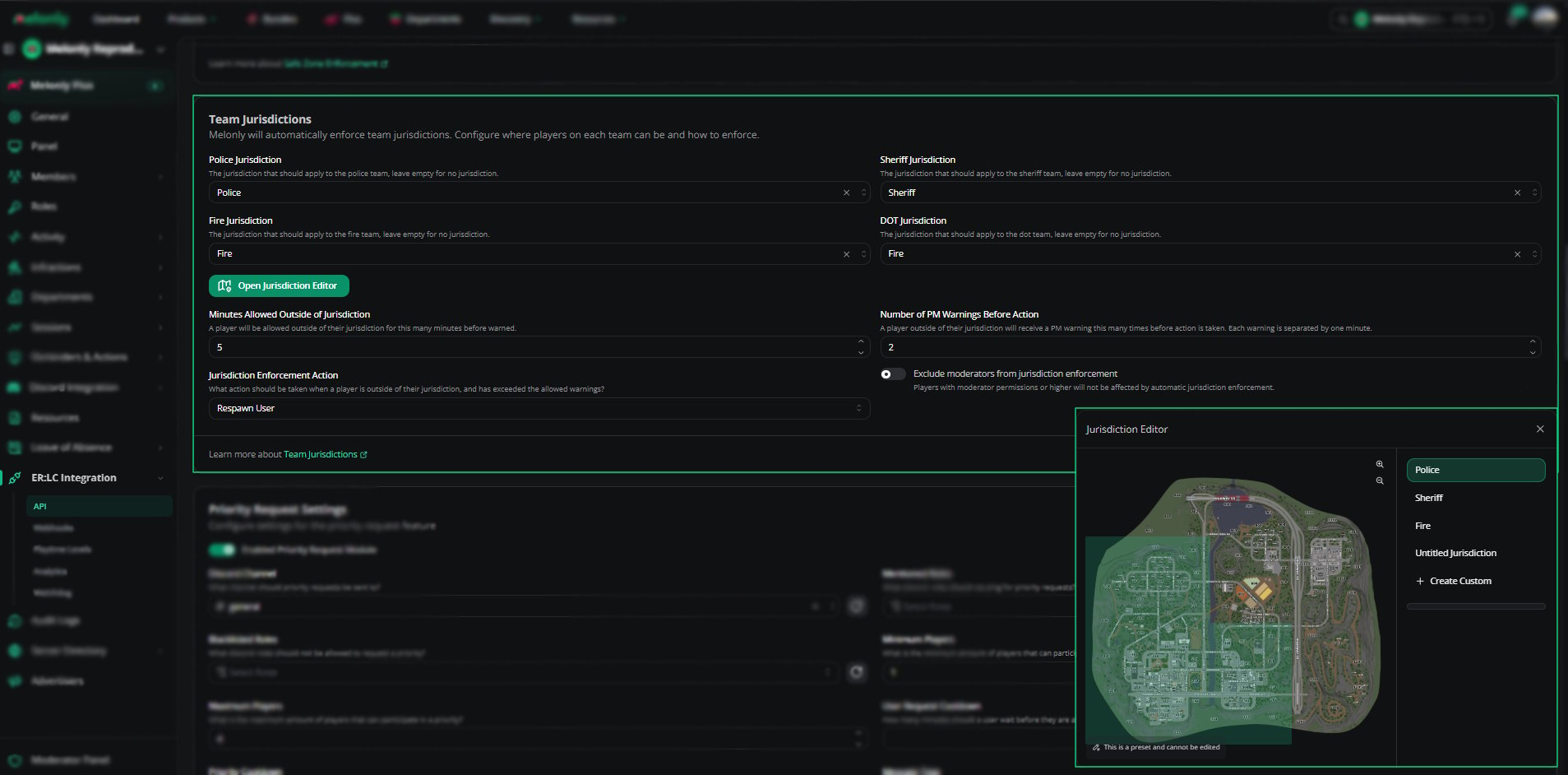
Team Jurisdictions allow you to define where each ER:LC team is permitted to operate.If a player leaves their assigned jurisdiction for too long, the system will automatically warn them and if needed, take action such as respawning the player.
How to use Team Jurisdictions
You can configure Team Jurisdictions from your
ER:LC Integration → API page, located beneath Safe Zone Enforcement.
ER:LC Integration → API page, located beneath Safe Zone Enforcement.
Configuration Options
1
Assign Jurisdictions to Teams
Each team, Police, Sheriff, Fire, and DOT, can be assigned a specific jurisdiction.
Leave a team blank if you do not want it to be restricted.
Leave a team blank if you do not want it to be restricted.
2
Open Jurisdiction Editor
Click this button to view or modify the boundaries of each jurisdiction.
You can use preset jurisdictions or create custom ones.
You can use preset jurisdictions or create custom ones.
3
Minutes Allowed Outside of Jurisdiction
Set how long a player may remain outside their jurisdiction before receiving a warning.
For example, 5 minutes gives players time to return without immediate actions.
For example, 5 minutes gives players time to return without immediate actions.
4
Number of PM Warnings Before Action
Choose how many PM warnings a player receives before enforcement occurs.
Each warning is sent one minute apart.
Each warning is sent one minute apart.
5
Jurisdiction Enforcement Action
Select what happens when a player exceeds both the time limit and warning limit.
Such as Respawn the User, Make the User wanted and Kick the User.
Such as Respawn the User, Make the User wanted and Kick the User.
6
Exclude Moderators
Enable this to prevent moderators and higher staff from being affected by jurisdiction enforcement.
Using the Jurisdiction Editor
The Jurisdiction Editor allows you to view, assign, and create jurisdiction boundaries directly on the ER:LC map.1
Select a Jurisdiction
Choose from preset jurisdictions such as Police or Sheriff, or select a custom one.
2
View or Modify Boundaries
Preset jurisdictions cannot be edited, but custom ones can be reshaped by adjusting boundary points on the map.
3
Create a Custom Jurisdiction
Select + Create Custom to draw a new jurisdiction anywhere on the map.
4
Save Your Changes
Click Save to apply your updated jurisdiction layout.
Changes take effect immediately during active sessions.
Changes take effect immediately during active sessions.
Configuration
Example Use Cases
- Restrict Police to city limits while Sheriff covers county areas
- Assign Fire/EMS to a specific district for structured response
- Create custom DOT jurisdictions for roadwork or event zones
- Automatically respawn players who repeatedly leave their assigned area
- Allow moderators to bypass restrictions while still enforcing them for regular players
Need help?
Still have questions? Join our Discord server for support from the Melonly Team.