
What is a Raid Rollback?
The Raid Rollback feature allows you to instantly revert disruptive actions taken during a raid.This includes mass bans, unauthorized moderator/admin permissions, and other unwanted changes. It provides a fast, reliable way to restore your server to its previous state with just a few clicks.
How to use the Raid Rollback feature?
You can access the Raid Rollback tool from your
ER:LC Integration → API page, located directly beneath Server Configuration.
ER:LC Integration → API page, located directly beneath Server Configuration.
Usage
You can perform a Raid Rollback in just a few simple steps.1
Select the
Initiate Raid Rollback button, then click Continue2
Select the user that performed the Raid - You can search for them using their Roblox Username
3
Enter the approximate time the first raid command was executed.
4
Select the commands the raider used - such as
ban, mod, unmod, etc.5
Submit the information you have provided.
6
Choose all relevant commands you wish to revert and click
Perform Rollback.7
Hit Submit.
The system will automatically revert the user’s actions using counter‑commands
(e.g.,
The system will automatically revert the user’s actions using counter‑commands
(e.g.,
unban for ban, unmod for mod).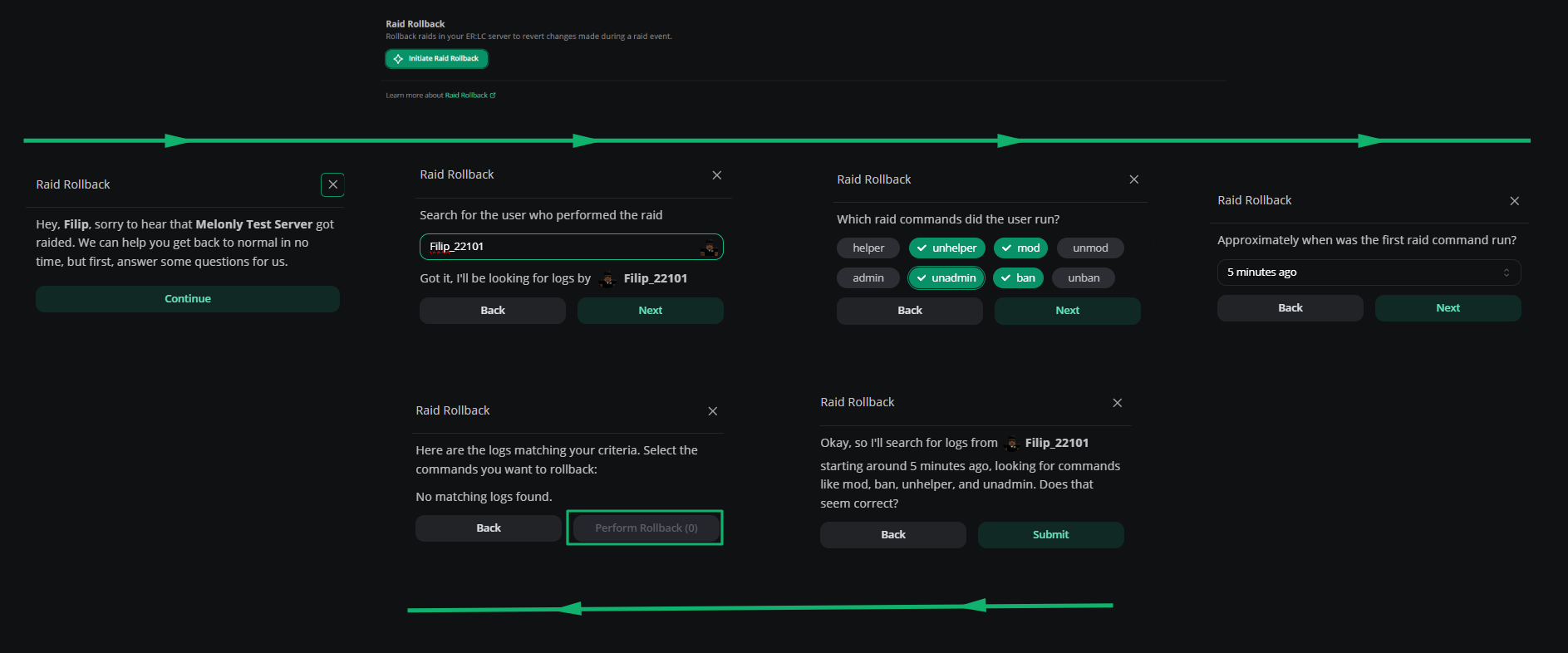
Raid rollback
Need help?
Still have questions? Join our Discord server for support from the Melonly Team.