
What is Safe Zone Enforcement?
Safe Zone Enforcement automatically monitors all defined safe zones during active ER:LC sessions.If a player kills another player inside a safe zone, the system will take action - such as kicking, or banning - based on your configured thresholds. This ensures fair gameplay, protects spawn areas, and prevents intentional safe‑zone abuse without requiring constant manual moderation.
How to use Safe Zone Enforcement
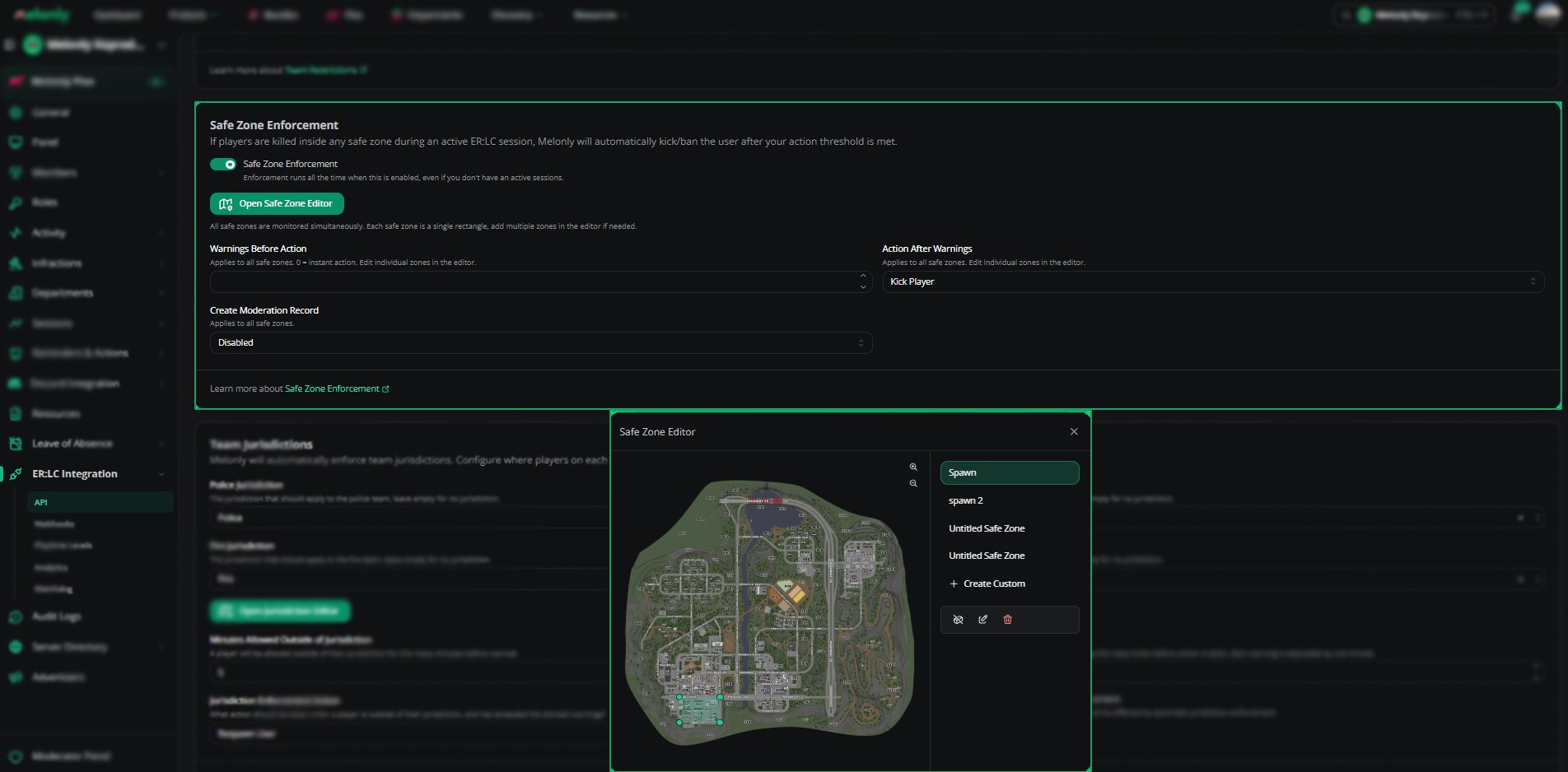
You can configure Safe Zone Enforcement from your
ER:LC Integration → API page, located beneath Team Restrictions.
ER:LC Integration → API page, located beneath Team Restrictions.
Configuration Options
1
Enable Safe Zone Enforcement
Toggle this setting to turn the feature on or off.
When enabled, the system will automatically monitor all safe zones during active sessions.
When enabled, the system will automatically monitor all safe zones during active sessions.
2
Warnings Before Action
Set how many warnings a player should receive before the system takes action.
Setting this to 0 means the action is taken instantly with no warnings.
Setting this to 0 means the action is taken instantly with no warnings.
3
Action After Warnings
Choose what happens once the warning threshold is reached.
4
Create Moderation Record
Decide whether a moderation record should be created when a violation occurs.
- Enabled - every violation is logged
- Disabled - no logs are created
5
Open Safe Zone Editor
Click this button to configure the boundaries of your safe zones.
You can edit existing zones or create custom ones.
You can edit existing zones or create custom ones.
Using the Safe Zone Editor
The Safe Zone Editor allows you to visually define and adjust safe‑zone boundaries directly on the ER:LC map.1
Select an Existing Zone
Choose from predefined zones such as Spawn, Spawn 2, or previously created custom zones.
2
Modify Zone Boundaries
Click on any boundary point to move, reshape, or resize the safe zone.
This gives you full control over protected areas.
This gives you full control over protected areas.
3
Create a Custom Zone
Select + Create Custom to draw a new safe zone anywhere on the map.
4
Save Your Changes
Click Save to apply your updated safe‑zone layout.
Changes take effect immediately during active sessions.
Changes take effect immediately during active sessions.
Configuration
Example Use Cases
- Prevent spawn‑killing by enforcing instant kicks in spawn zones
- Create custom safe zones for events or training sessions
- Log moderation records for safe‑zone violations
Need help?
Still have questions? Join our Discord server for support from the Melonly Team.