
Quiz turns any application or form into a graded test. Use it for training, onboarding, or evaluations. Quizzes support multiple question types, configurable scoring, time limits, and randomized order.Documentation Index
Fetch the complete documentation index at: https://docs.melonly.xyz/docs/llms.txt
Use this file to discover all available pages before exploring further.
What you get
- Question types — Multiple-choice, true/false, and short answer. See response types.
- Automated grading — Set passing scores and Melonly grades submissions for you.
- Point allocation — Weight questions by importance.
- Correct answers — Define answers to enable auto-grading.
- Instant feedback — Show results to the submitter immediately.
Quiz works at both the server and department level.
Add points to a question
Open the form
From your server or department dashboard, open Resources and select the form or application.
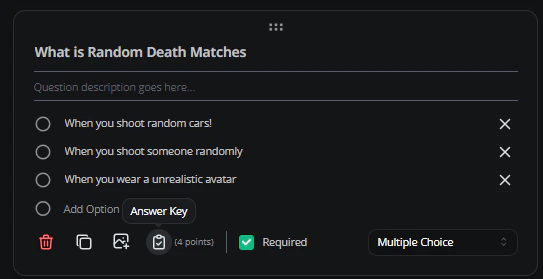
Set the correct answer
Open the form
From your server or department dashboard, open Resources and select the form or application.
If Quiz isn’t visible, enable it in your server or department form settings. See response types.
Need help?
Still have questions? Join our Discord server for support from the Melonly team.