
What is the Public Profile?
Your public profile is the page anyone can open atmelonly.xyz/profile/@yourhandle, or the shortlink melon.ly/@yourhandle. It’s built from what you set on Your Profile and is themed with your profile color.
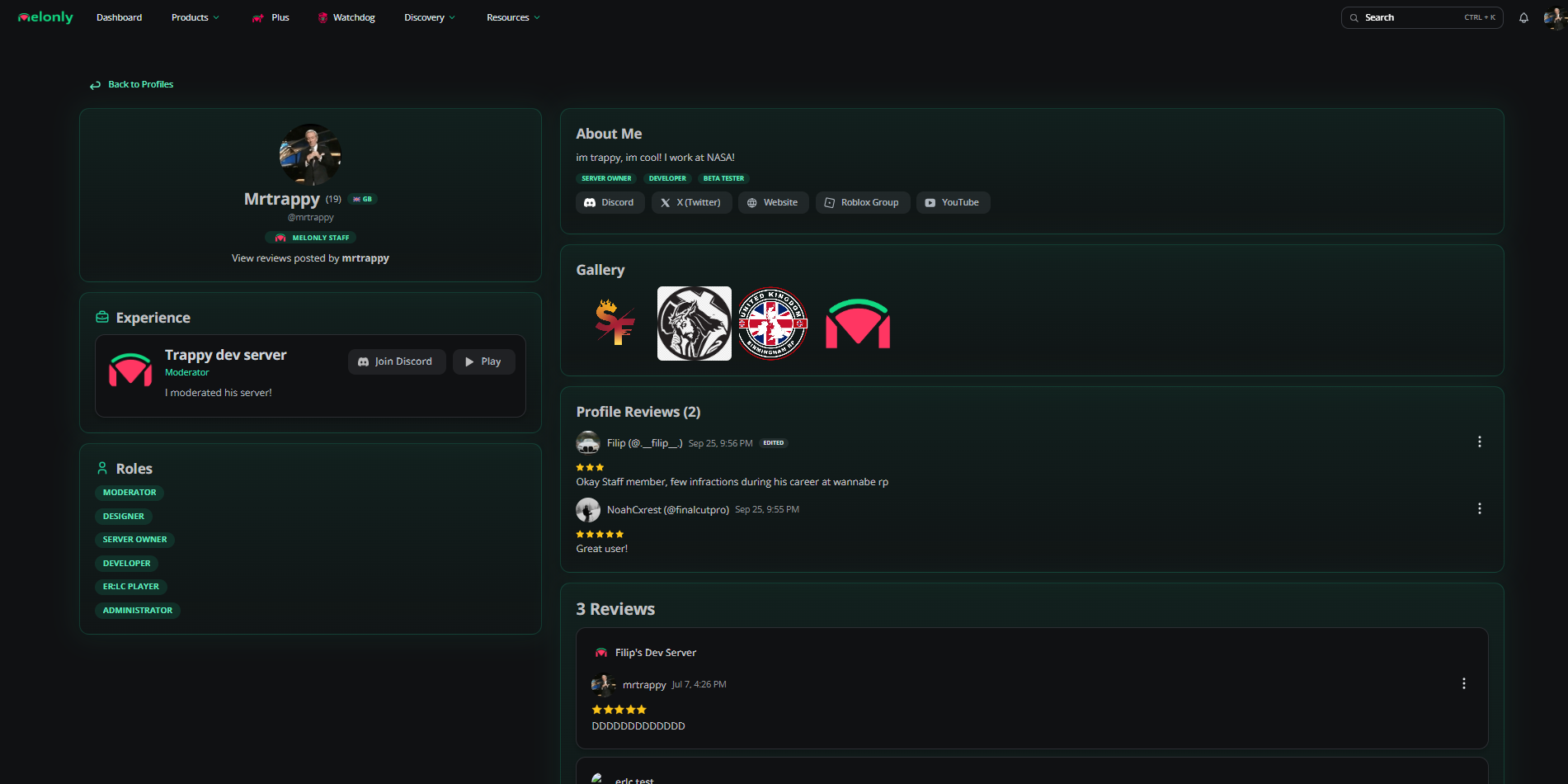
Public profile
What Visitors See
Visitors can click your Discord button to open your Discord profile, or hold it to copy your Discord ID. Custom social links only show while you have Melonly Pro.
Badges
Badges
Sharing Your Profile
Click the share button on your profile header and then Copy Link, or use Copy Shortlink on Your Profile.Profile Reviews
Signed in users can leave one review on someone else’s profile, or one per experience entry.1
Open the review box
On the profile, click Write a review… in Profile Reviews.
2
Rate and write
Pick 1 to 5 stars, optionally choose an experience to review, and write your message (up to 1000 characters).
3
Submit
Click Submit Review. You can edit or delete it later from the same box.
Reporting a Profile
If a profile breaks the rules, click the flag button on its header and add an optional reason. See Profile Directory for more on reporting.Need help?
Still have questions? Join our Discord server for support from the Melonly Team.