
What is the Activity Leaderboard?
The Activity Leaderboard shows how much time each moderator has spent online during an activity wave.It ranks members by their total activity time and highlights whether they met the required hours. The leaderboard updates automatically and provides a clear overview of staff performance.
It is useful for tracking engagement, identifying inactive members, and reviewing wave results.
How the Leaderboard Works
The leaderboard pulls data from the current or selected activity wave.Each member is listed with their activity time, role, and requirement status. If a member meets the required hours, they are marked as met.
If they do not meet the requirement, they are marked as failed. Leaderboard updates may take a few minutes to process after new activity is recorded.
Configuration Options
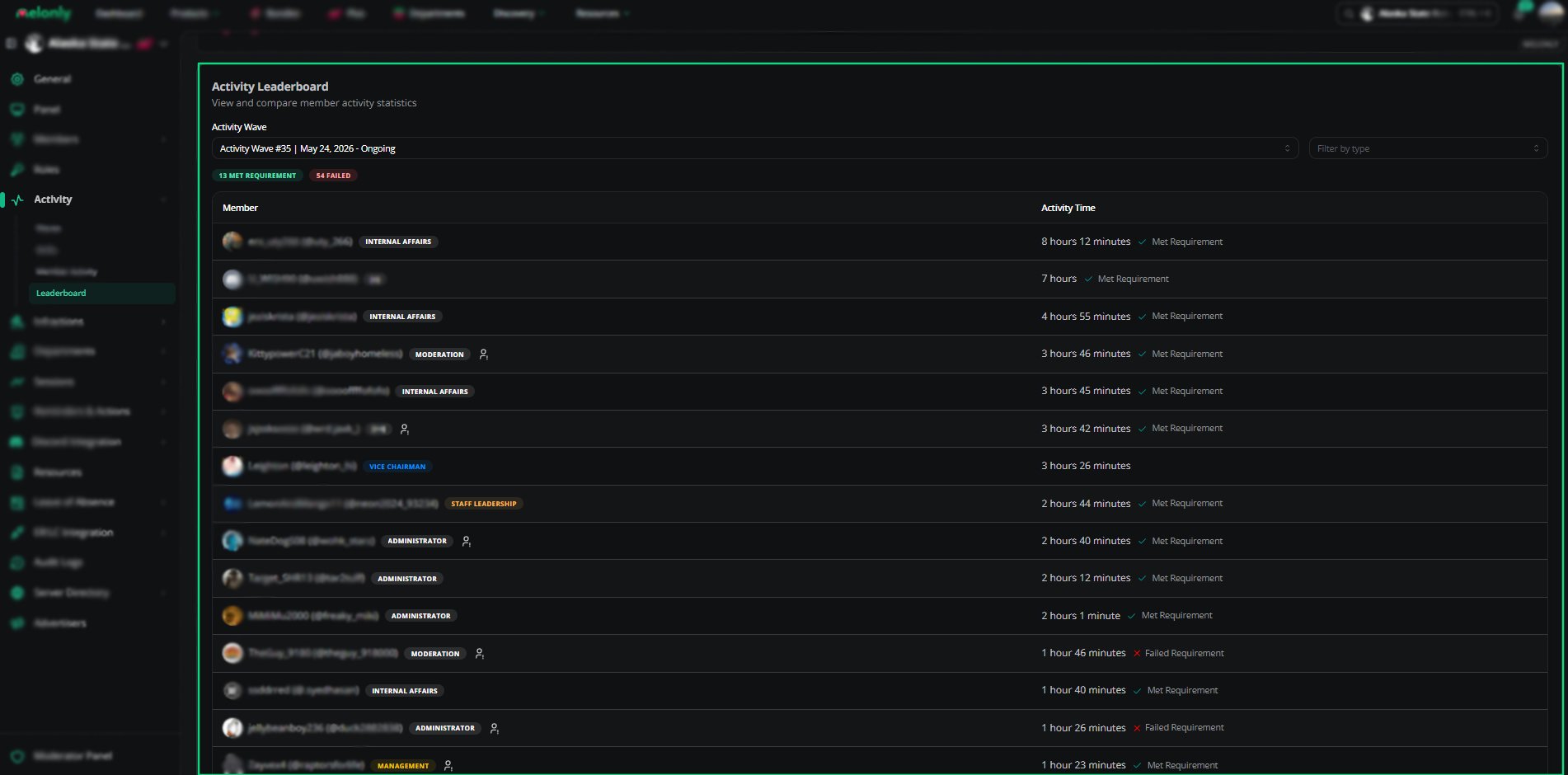
Activity Leaderboard
How to Configure
1
Select an Activity Wave
Choose the wave you want to review. The leaderboard will load results for that period.
2
Apply Filters
Use the type filter to narrow results by shift type if needed.
3
Review Requirement Status
Check which members met the required hours and which members did not.
Example Use Cases
- Reviewing staff performance for a completed wave
- Identifying members who failed hour requirements
- Comparing activity across different shift types
- Monitoring engagement during ongoing waves
Need help?
Still have questions? Join our Discord server for support from the Melonly Team.