
What is a Unit?
A unit is your on-duty identity in the CAD: your callsign, roleplay name, rank, agency and equipment. You need an active unit before you can use the Police, Fire, EMS, DOT or Dispatch panels.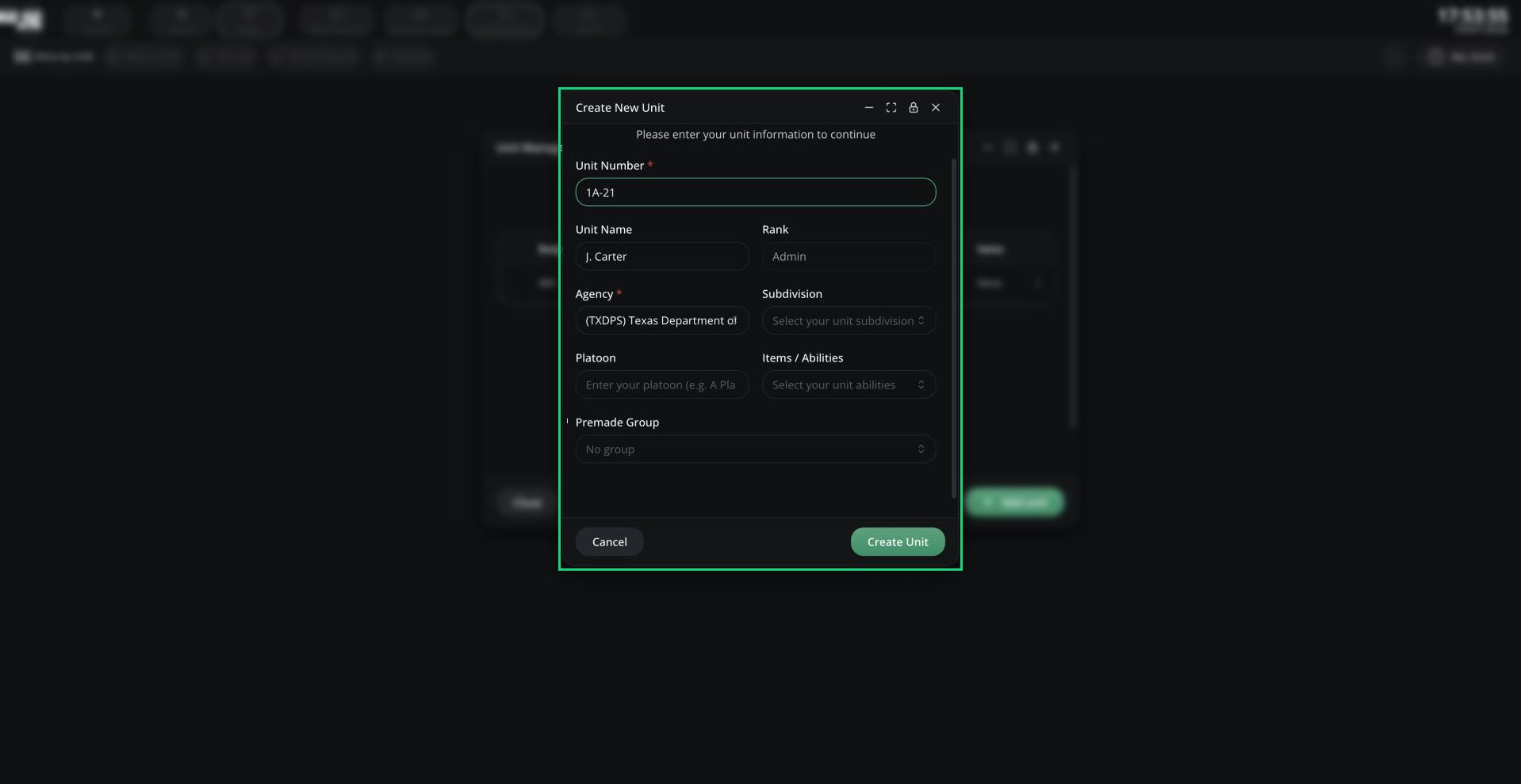
Create New Unit
Creating a Unit
1
Open the Unit Manager
Click Create Unit (or Select Unit) in the middle of the panel, or click the unit chip in the top bar.
2
Add a unit
Click Add unit, fill in the form and click Create Unit.
3
Go on duty
Click the unit’s row to log in as it. Click it again to log out.
If Add unit is greyed out, your server has no agencies on this panel you can use. Agencies are set up by admins in Customization. An agency linked to a department is only available if you’re in that department.
Unit Fields
Joining a Panel
Your server can add extra checks before you go on duty:- Some panels only accept units from certain agencies.
- You may need to be clocked in. Open the CAD menu, go to Activity and start a shift first. Shifts started from the CAD end when you leave the panel.
- You may need a live bodycam first. See Bodycam.
Need help?
Still have questions? Join our Discord server for support from the Melonly Team.