> ## Documentation Index
> Fetch the complete documentation index at: https://docs.melonly.xyz/llms.txt
> Use this file to discover all available pages before exploring further.
# Online Staff
> See which staff are on duty, view moderator cards, and end other staff members' shifts.
***
## What is Online Staff?
The row of avatars under your shift controls shows every staff member who is currently on shift or on break.
| Dot colour | Status |
| - | - |
| Green | On shift |
| Yellow | On break |
***
## Moderator Cards
Click any staff avatar to open their moderator card. You can also click a staff member's name on any log.
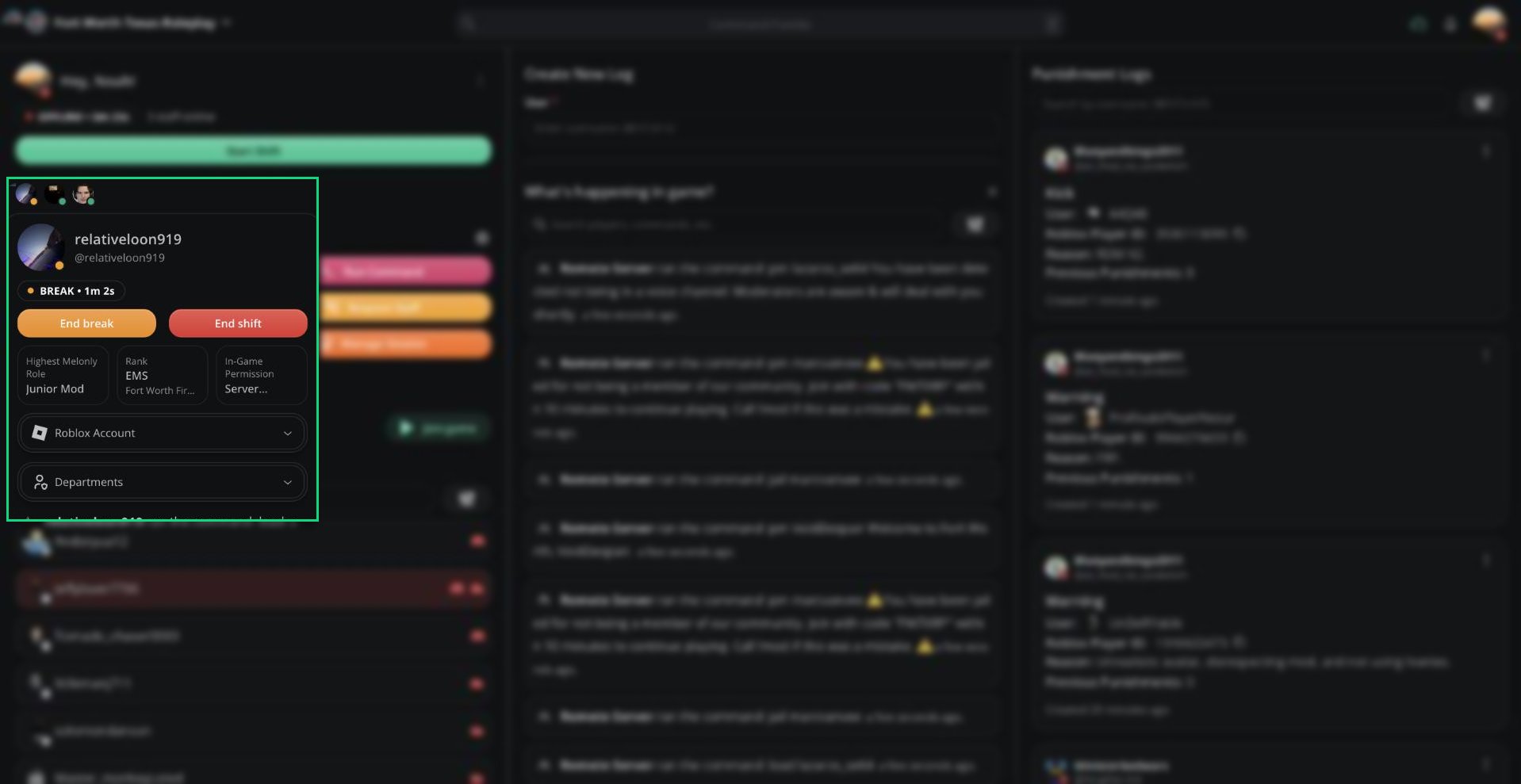 | Section | What it shows |
| - | - |
| Status | Their shift status and how long they've been on shift or on break |
| Highest Melonly Role | Their highest role in your server |
| Rank | Their highest department rank |
| In-Game Permission | Their ER:LC permission level |
| Roblox Account | Their linked Roblox account, with a button to open their profile |
| Departments | Every department they belong to and their rank |
Their most recent in-game activity appears at the bottom of the card.
***
## Ending Another Member's Shift
Requires the Manage Shifts permission or access to the Activity dashboard page.
If a staff member forgot to clock out, open their moderator card:
* **End shift** ends their shift.
* **End break** ends their break and puts them back on shift.
You can only end shifts for members below you in the role hierarchy. The shift is recorded as ended by you.
Your own moderator card has the same buttons, so you can end your shift from there too.
***
Still have questions? Join our Discord server for support from the Melonly Team.
This documentation is built and hosted on [Mintlify](https://mintlify.com), a developer documentation platform.
| Section | What it shows |
| - | - |
| Status | Their shift status and how long they've been on shift or on break |
| Highest Melonly Role | Their highest role in your server |
| Rank | Their highest department rank |
| In-Game Permission | Their ER:LC permission level |
| Roblox Account | Their linked Roblox account, with a button to open their profile |
| Departments | Every department they belong to and their rank |
Their most recent in-game activity appears at the bottom of the card.
***
## Ending Another Member's Shift
Requires the Manage Shifts permission or access to the Activity dashboard page.
If a staff member forgot to clock out, open their moderator card:
* **End shift** ends their shift.
* **End break** ends their break and puts them back on shift.
You can only end shifts for members below you in the role hierarchy. The shift is recorded as ended by you.
Your own moderator card has the same buttons, so you can end your shift from there too.
***
Still have questions? Join our Discord server for support from the Melonly Team.
This documentation is built and hosted on [Mintlify](https://mintlify.com), a developer documentation platform.