> ## Documentation Index
> Fetch the complete documentation index at: https://docs.melonly.xyz/llms.txt
> Use this file to discover all available pages before exploring further.
# Public Profile
> What people see on your public Melonly profile, how to share it, and how profile reviews work.
***
## What is the Public Profile?
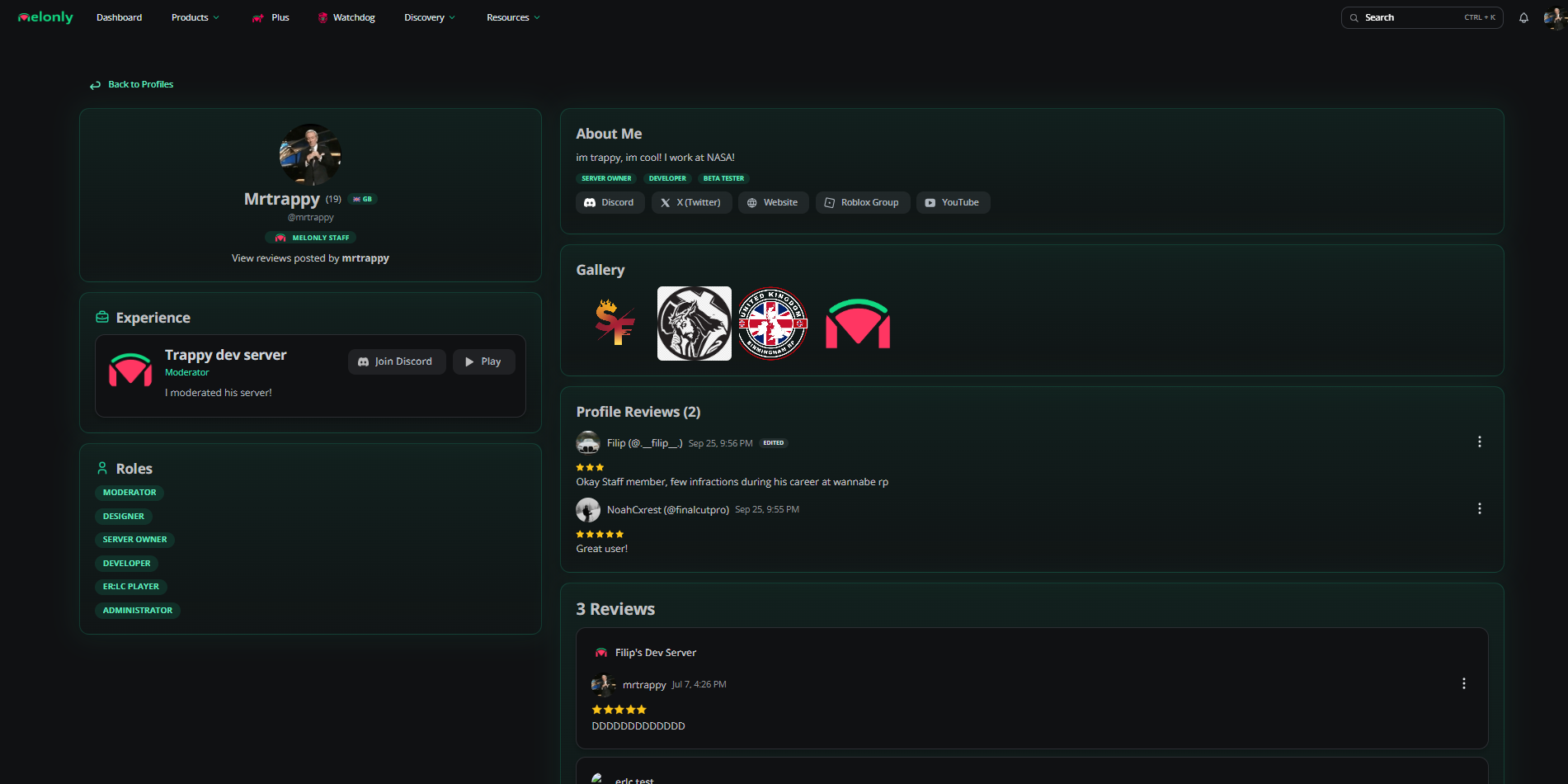
Your public profile is the page anyone can open at `melonly.xyz/profile/@yourhandle`, or the shortlink `melon.ly/@yourhandle`. It's built from what you set on [Your Profile](/Guides/profile) and is themed with your profile color.
 ***
## What Visitors See
| Section | What it shows |
| - | - |
| Header | Avatar, display name, age, country, @handle, local time, average review rating and badges. |
| Experience | Your verified experience. Unverified entries are hidden from everyone. |
| Roles | The roles you picked. |
| About Me | Your bio, tags, social links, Roblox account and a Discord button. Only shown if you have a bio. |
| Gallery | Your profile images. Click one to zoom. |
| Profile Reviews | Reviews other users have left about you. |
| Reviews | Reviews you've posted about servers, linked to their listings. |
Visitors can click your Discord button to open your Discord profile, or hold it to copy your Discord ID. Custom social links only show while you have Melonly Pro.
| Badge | Who gets it |
| - | - |
| Pro | Melonly Pro subscribers. |
| Plus Subscriber | Melonly Plus subscribers. |
| Departments Subscriber | Departments subscribers. |
| Watchdog Subscriber | Watchdog subscribers. |
| Melonly Staff | Members of the Melonly Team. |
| PRC Staff | PRC staff members. |
| Affiliate | Owners of partnered servers. |
| VIP | Recognized VIPs, awarded by staff. |
| Early Supporter | Users who made a purchase between January 2023 and July 2025. |
***
## Sharing Your Profile
Click the share button on your profile header and then **Copy Link**, or use **Copy Shortlink** on [Your Profile](/Guides/profile#profile-overview).
***
## Profile Reviews
Signed in users can leave one review on someone else's profile, or one per experience entry.
On the profile, click **Write a review\...** in Profile Reviews.
Pick 1 to 5 stars, optionally choose an experience to review, and write your message (up to 1000 characters).
Click **Submit Review**. You can edit or delete it later from the same box.
You can't review your own profile. Use the menu on a review to report abuse.
***
## Reporting a Profile
If a profile breaks the rules, click the flag button on its header and add an optional reason. See [Profile Directory](/Discovery/profilediscovery) for more on reporting.
***
Still have questions? Join our Discord server for support from the Melonly Team.
This documentation is built and hosted on [Mintlify](https://mintlify.com), a developer documentation platform.
***
## What Visitors See
| Section | What it shows |
| - | - |
| Header | Avatar, display name, age, country, @handle, local time, average review rating and badges. |
| Experience | Your verified experience. Unverified entries are hidden from everyone. |
| Roles | The roles you picked. |
| About Me | Your bio, tags, social links, Roblox account and a Discord button. Only shown if you have a bio. |
| Gallery | Your profile images. Click one to zoom. |
| Profile Reviews | Reviews other users have left about you. |
| Reviews | Reviews you've posted about servers, linked to their listings. |
Visitors can click your Discord button to open your Discord profile, or hold it to copy your Discord ID. Custom social links only show while you have Melonly Pro.
| Badge | Who gets it |
| - | - |
| Pro | Melonly Pro subscribers. |
| Plus Subscriber | Melonly Plus subscribers. |
| Departments Subscriber | Departments subscribers. |
| Watchdog Subscriber | Watchdog subscribers. |
| Melonly Staff | Members of the Melonly Team. |
| PRC Staff | PRC staff members. |
| Affiliate | Owners of partnered servers. |
| VIP | Recognized VIPs, awarded by staff. |
| Early Supporter | Users who made a purchase between January 2023 and July 2025. |
***
## Sharing Your Profile
Click the share button on your profile header and then **Copy Link**, or use **Copy Shortlink** on [Your Profile](/Guides/profile#profile-overview).
***
## Profile Reviews
Signed in users can leave one review on someone else's profile, or one per experience entry.
On the profile, click **Write a review\...** in Profile Reviews.
Pick 1 to 5 stars, optionally choose an experience to review, and write your message (up to 1000 characters).
Click **Submit Review**. You can edit or delete it later from the same box.
You can't review your own profile. Use the menu on a review to report abuse.
***
## Reporting a Profile
If a profile breaks the rules, click the flag button on its header and add an optional reason. See [Profile Directory](/Discovery/profilediscovery) for more on reporting.
***
Still have questions? Join our Discord server for support from the Melonly Team.
This documentation is built and hosted on [Mintlify](https://mintlify.com), a developer documentation platform.