> ## Documentation Index
> Fetch the complete documentation index at: https://docs.melonly.xyz/llms.txt
> Use this file to discover all available pages before exploring further.
# Priority Requests
> Ask staff for a priority scenario in an ER:LC server and track your past requests.
***
## What are Priority Requests?
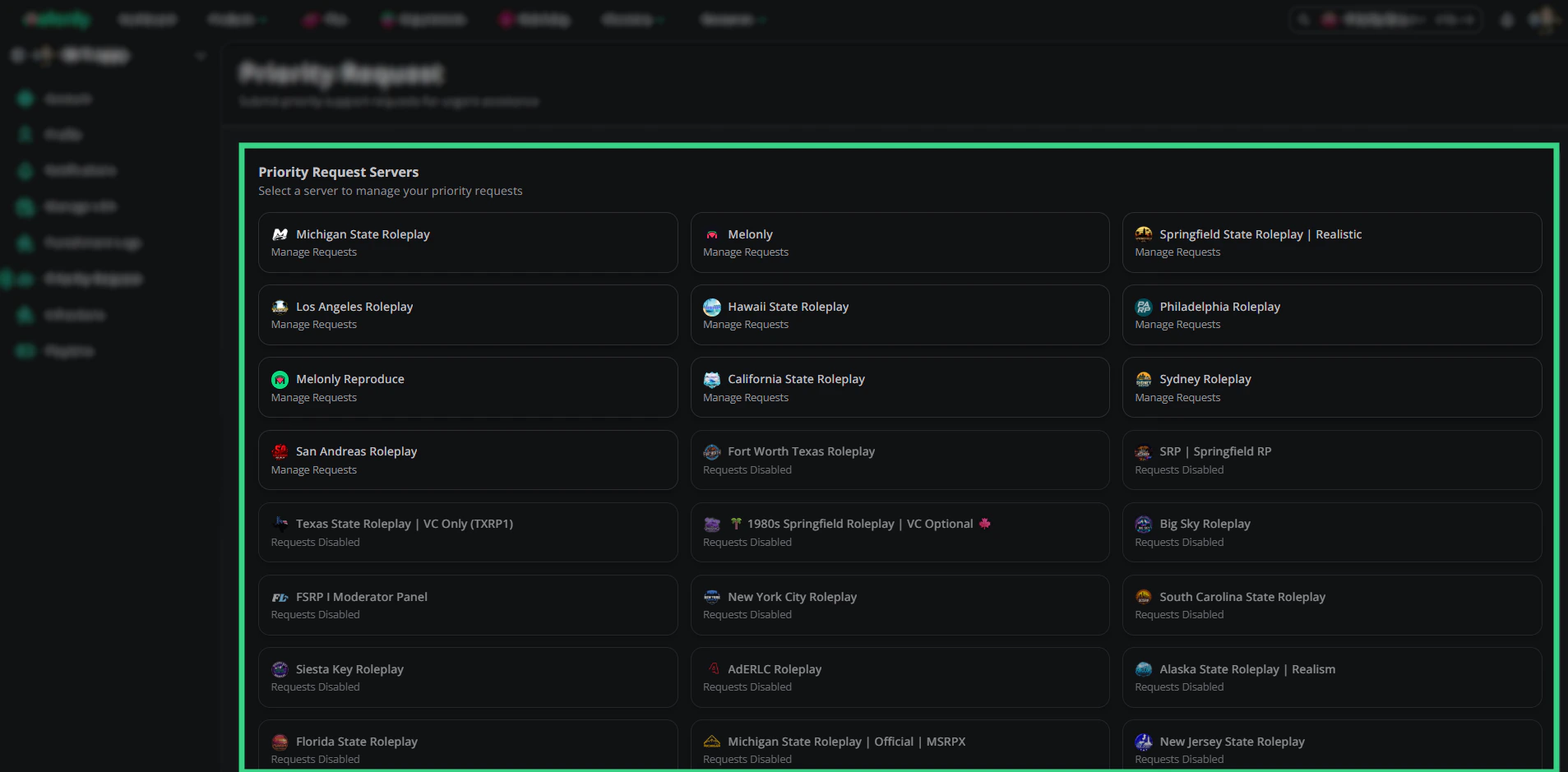
A priority is a roleplay scenario, like a pursuit or robbery, that staff approve before it starts. [Priority Request](https://melonly.xyz/my/priority) lets you ask for one in any ER:LC server that has priority requests turned on.
 ***
## Submitting a Request
Open [Priority Request](https://melonly.xyz/my/priority) and click a server marked **Manage Requests**. Servers marked Requests Disabled don't accept them.
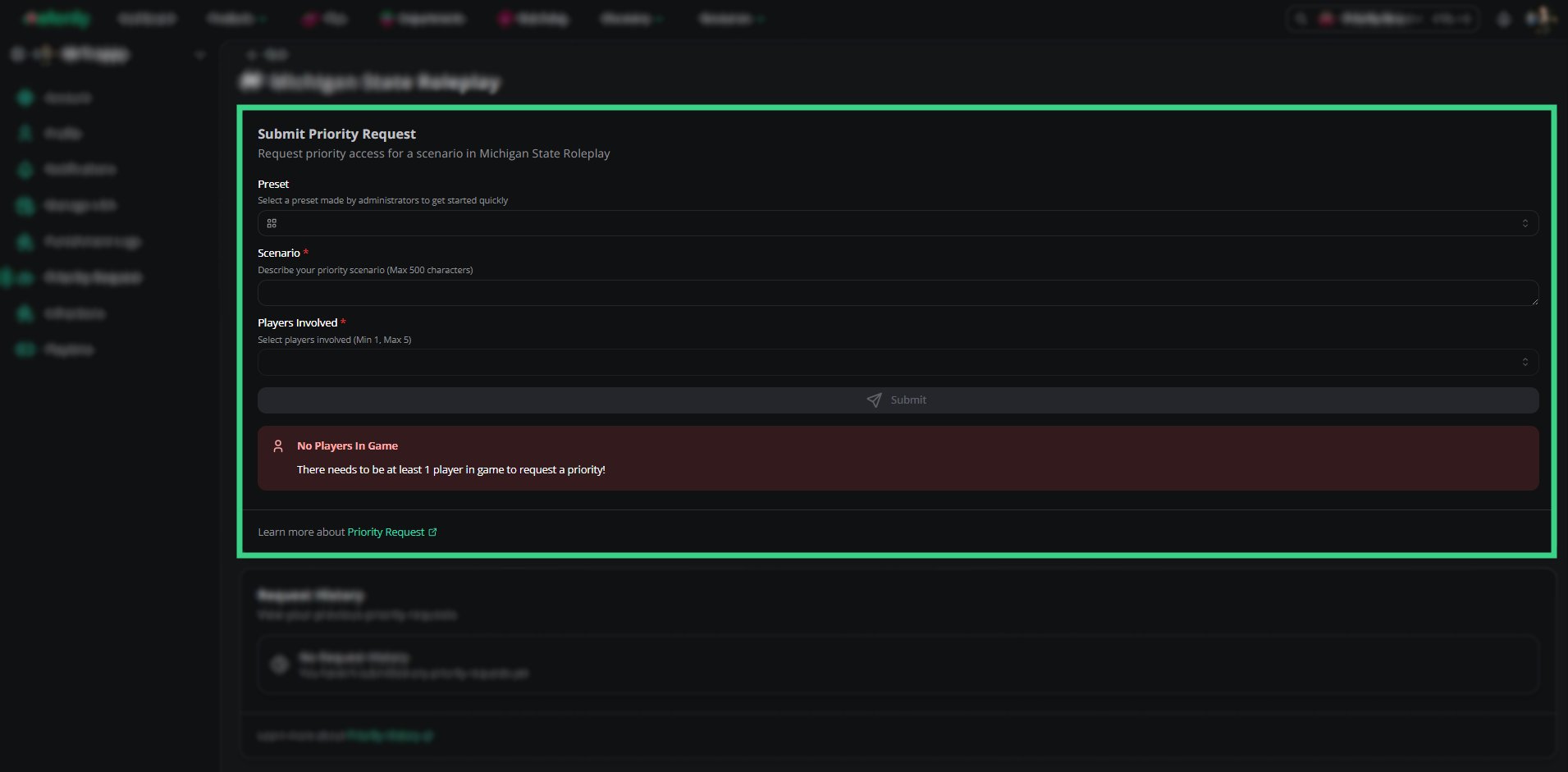
Pick a **Preset** if the server has any, or write the **Scenario** yourself (up to 500 characters).
Select the **Players Involved** from the players in the ER:LC server right now. The server sets how many you need (1 to 4 by default).
Click **Send priority request**. Staff will approve or deny it.
***
## Submitting a Request
Open [Priority Request](https://melonly.xyz/my/priority) and click a server marked **Manage Requests**. Servers marked Requests Disabled don't accept them.
Pick a **Preset** if the server has any, or write the **Scenario** yourself (up to 500 characters).
Select the **Players Involved** from the players in the ER:LC server right now. The server sets how many you need (1 to 4 by default).
Click **Send priority request**. Staff will approve or deny it.
 ***
## When You Can't Request
| Reason | What to do |
| - | - |
| You already have a pending request | Wait for staff to review it. Only one can be pending at a time. |
| You're on cooldown | The server makes you wait between requests. Try again later. |
| You're blocked from requesting | You have a role the server blocks. Ask the server's staff. |
| No players in game | At least one player must be in the ER:LC server. |
| No active session | Some servers only accept requests during a session. |
***
## Request History
Your past requests are listed below the form. Expand one to see the scenario, players, who reviewed it, the staff message and the priority's start time, timer and end time.
| Status | Meaning |
| - | - |
| Pending | Waiting for staff. |
| Queued | Approved, waiting to start. |
| Ongoing | Happening now. |
| Finished | Completed. |
| Denied | Not approved. |
| Cancelled | Cancelled before it ran. |
***
## Related
* [Priority requests in the Mod Panel](/Modpanel/toolbox/priorityrequests)
***
Still have questions? Join our Discord server for support from the Melonly Team.
This documentation is built and hosted on [Mintlify](https://mintlify.com), a developer documentation platform.
***
## When You Can't Request
| Reason | What to do |
| - | - |
| You already have a pending request | Wait for staff to review it. Only one can be pending at a time. |
| You're on cooldown | The server makes you wait between requests. Try again later. |
| You're blocked from requesting | You have a role the server blocks. Ask the server's staff. |
| No players in game | At least one player must be in the ER:LC server. |
| No active session | Some servers only accept requests during a session. |
***
## Request History
Your past requests are listed below the form. Expand one to see the scenario, players, who reviewed it, the staff message and the priority's start time, timer and end time.
| Status | Meaning |
| - | - |
| Pending | Waiting for staff. |
| Queued | Approved, waiting to start. |
| Ongoing | Happening now. |
| Finished | Completed. |
| Denied | Not approved. |
| Cancelled | Cancelled before it ran. |
***
## Related
* [Priority requests in the Mod Panel](/Modpanel/toolbox/priorityrequests)
***
Still have questions? Join our Discord server for support from the Melonly Team.
This documentation is built and hosted on [Mintlify](https://mintlify.com), a developer documentation platform.