> ## Documentation Index
> Fetch the complete documentation index at: https://docs.melonly.xyz/llms.txt
> Use this file to discover all available pages before exploring further.
# Verification
> Verify that members of your linked Discord server own a Roblox account, and give them roles.
***
## What is Verification?
Melonly Verification checks that people in your linked Discord server own a Roblox account, and gives them roles when they verify. It needs a [linked Discord server](/Department/settings/discord). Click **Enable Verification** to turn it on.
***
## Configure
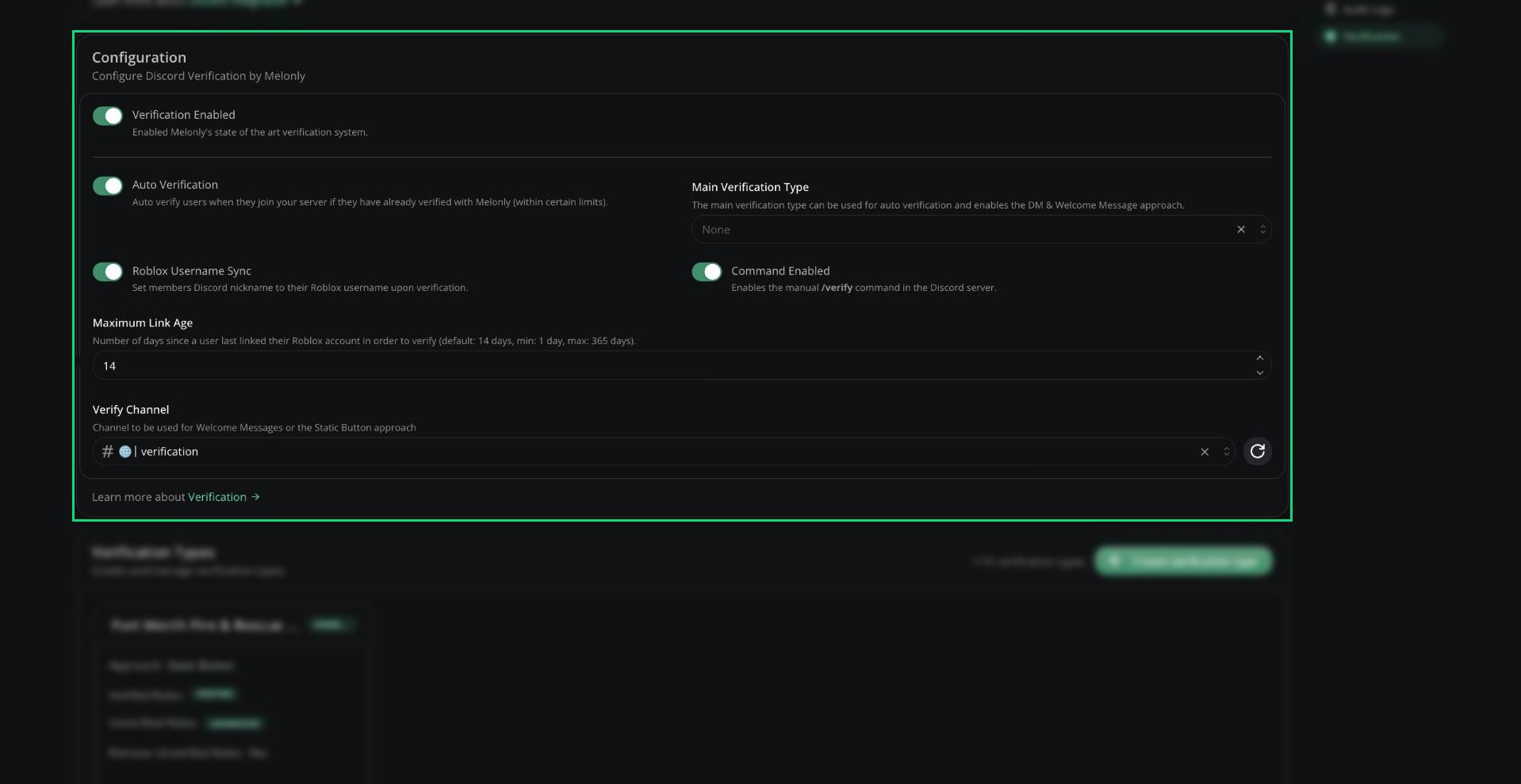 | Setting | Description |
| - | - |
| Verification Enabled | Turns verification on or off |
| Auto Verification | Verifies people automatically when they join, if they've already verified with Melonly |
| Main Verification Type | The type used for auto verification. Only the main type can use Direct Message and Welcome Message. |
| Roblox Username Sync | Sets the member's Discord nickname to their Roblox username |
| Command Enabled | Turns on `/verify` in your Discord server |
| Maximum Link Age | How recently someone must have linked their Roblox account, in days (1 to 365, default 14) |
| Verify Channel | Where Welcome Message and Static Button messages are posted |
When you pick a Verify Channel, Melonly offers to post the verification message there.
***
## Verification Types
Verification types decide how people are prompted, which roles they get, and what they need to pass. You can have up to 15. Save the Configuration card before clicking **Create verification type**.
| Setting | Description |
| - | - |
| Verification Enabled | Turns verification on or off |
| Auto Verification | Verifies people automatically when they join, if they've already verified with Melonly |
| Main Verification Type | The type used for auto verification. Only the main type can use Direct Message and Welcome Message. |
| Roblox Username Sync | Sets the member's Discord nickname to their Roblox username |
| Command Enabled | Turns on `/verify` in your Discord server |
| Maximum Link Age | How recently someone must have linked their Roblox account, in days (1 to 365, default 14) |
| Verify Channel | Where Welcome Message and Static Button messages are posted |
When you pick a Verify Channel, Melonly offers to post the verification message there.
***
## Verification Types
Verification types decide how people are prompted, which roles they get, and what they need to pass. You can have up to 15. Save the Configuration card before clicking **Create verification type**.
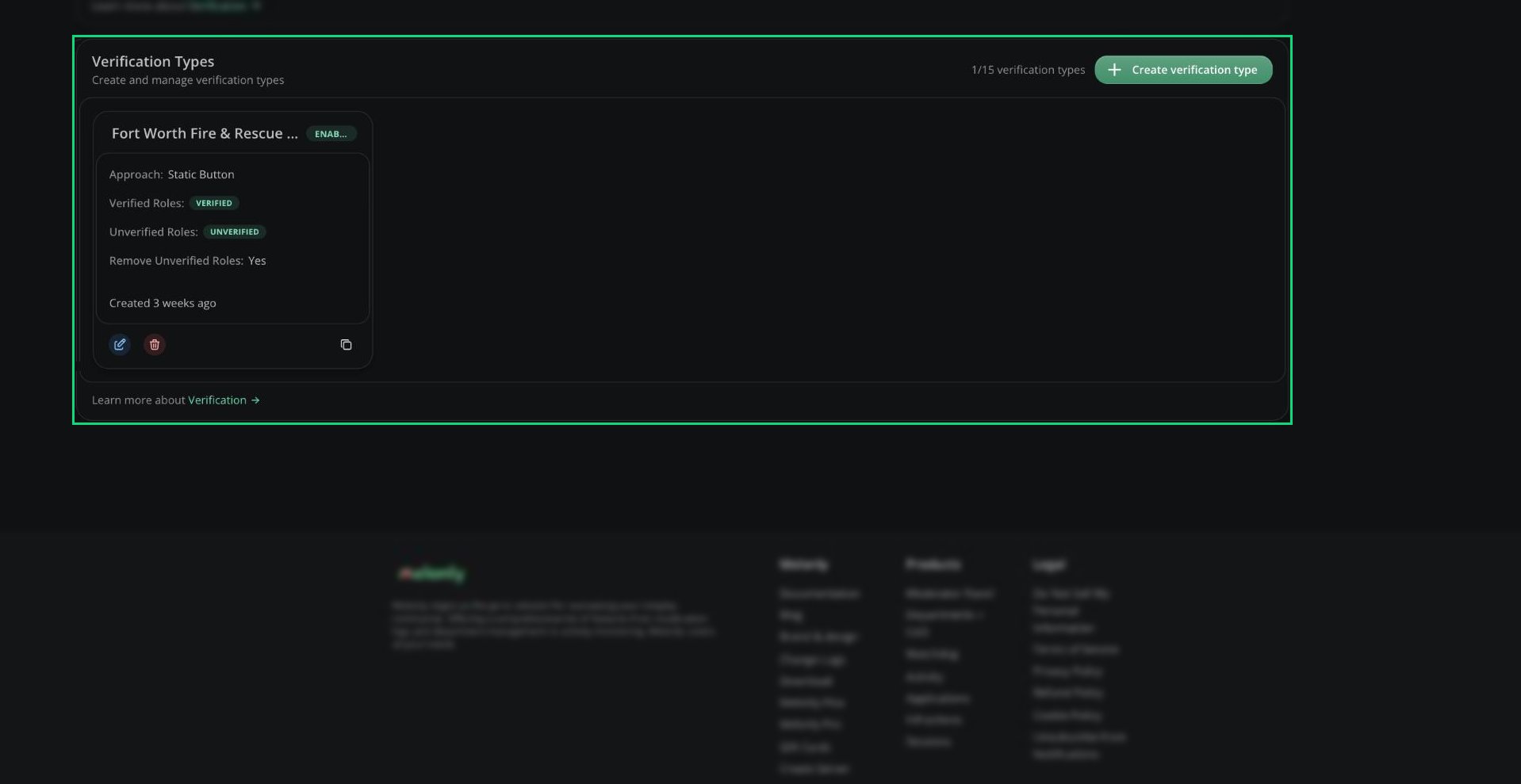 | Field | Description |
| - | - |
| Enabled | Turns this type on or off |
| Name | Shown to users. Required. |
| Remove unverified roles | Removes unverified roles when someone verifies. On by default. |
| Verified Roles | Discord roles given after verifying |
| Unverified Roles | Discord roles given to people who haven't verified |
| Approach Type | How people are prompted (see below) |
| Verification Requirements | Extra checks people must pass (see below) |
Each type has **Copy Verification Link** for a direct link to verify with that type.
| Approach | How it works |
| - | - |
| Direct Message | Melonly DMs people when they join. Main type only. |
| Static Button | A message with a verify button in your Verify Channel. The default. |
| Welcome Message | Melonly mentions people when they join, with a verify button. Main type only. |
| Slash Command | People run `/verify`. Needs Command Enabled. |
For Static Button, use the send button next to Approach Type to post the message. You can customise the DM, welcome or button message after creating the type.
| Requirement | Description |
| - | - |
| Group check | Must be in a Roblox group, optionally with a minimum or exact group role |
| Roblox account age | Account must be at least a set number of days old (default 7) |
With no requirements, anyone can verify.
Learn how verification works for your members.
***
Still have questions? Join our Discord server for support from the Melonly Team.
This documentation is built and hosted on [Mintlify](https://mintlify.com), a developer documentation platform.
| Field | Description |
| - | - |
| Enabled | Turns this type on or off |
| Name | Shown to users. Required. |
| Remove unverified roles | Removes unverified roles when someone verifies. On by default. |
| Verified Roles | Discord roles given after verifying |
| Unverified Roles | Discord roles given to people who haven't verified |
| Approach Type | How people are prompted (see below) |
| Verification Requirements | Extra checks people must pass (see below) |
Each type has **Copy Verification Link** for a direct link to verify with that type.
| Approach | How it works |
| - | - |
| Direct Message | Melonly DMs people when they join. Main type only. |
| Static Button | A message with a verify button in your Verify Channel. The default. |
| Welcome Message | Melonly mentions people when they join, with a verify button. Main type only. |
| Slash Command | People run `/verify`. Needs Command Enabled. |
For Static Button, use the send button next to Approach Type to post the message. You can customise the DM, welcome or button message after creating the type.
| Requirement | Description |
| - | - |
| Group check | Must be in a Roblox group, optionally with a minimum or exact group role |
| Roblox account age | Account must be at least a set number of days old (default 7) |
With no requirements, anyone can verify.
Learn how verification works for your members.
***
Still have questions? Join our Discord server for support from the Melonly Team.
This documentation is built and hosted on [Mintlify](https://mintlify.com), a developer documentation platform.