> ## Documentation Index
> Fetch the complete documentation index at: https://docs.melonly.xyz/llms.txt
> Use this file to discover all available pages before exploring further.
# Ranks
> Create, edit, order, and delete your department's ranks, and link them to Discord roles.
***
## What are Ranks?
Ranks make up your department's chain of command. Every member has exactly one rank, and each rank has its own [permissions](/Department/permissions). For extra permissions or groups on top of a rank, use [roles](/Department/roster#roles).
Managing ranks needs the Administrator permission, and you can only manage ranks below your own.
 ***
## Create a Rank
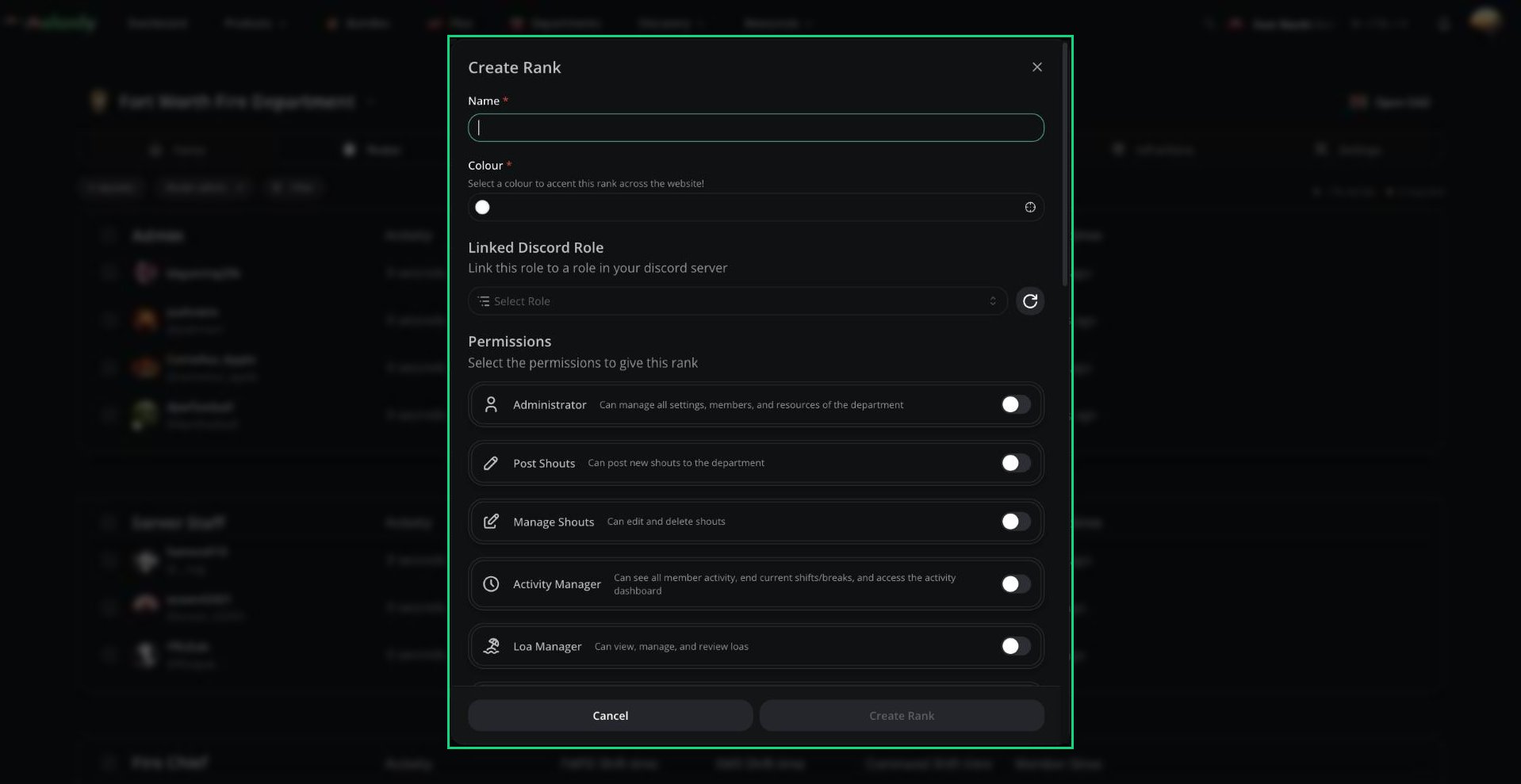
Click **Roster admin**, then **Create Rank**.
Give it a name and colour, link a Discord role if you want, and pick its [permissions](/Department/permissions).
New ranks are added at the bottom. Use **Move up** in the rank's menu to move it.
***
## Edit, Move and Delete Ranks
Click the three dots next to a rank name to edit, duplicate, delete, or move it. When you delete a rank that has members, you'll pick a rank to move them into.
***
## Linked Discord Roles
Each Discord role can be linked to one rank, and Melonly keeps them in sync:
* Rank changes in Melonly swap the member's Discord roles.
* Getting a linked role in Discord moves the member to the highest matching rank, and adds them to the department if needed.
* Losing their only linked rank role in Discord removes them from the department.
To sync roles between your main server and department servers, use Discord Role Syncing on your main server's [Departments page](/Dashboard/department).
***
Still have questions? Join our Discord server for support from the Melonly Team.
This documentation is built and hosted on [Mintlify](https://mintlify.com), a developer documentation platform.
***
## Create a Rank
Click **Roster admin**, then **Create Rank**.
Give it a name and colour, link a Discord role if you want, and pick its [permissions](/Department/permissions).
New ranks are added at the bottom. Use **Move up** in the rank's menu to move it.
***
## Edit, Move and Delete Ranks
Click the three dots next to a rank name to edit, duplicate, delete, or move it. When you delete a rank that has members, you'll pick a rank to move them into.
***
## Linked Discord Roles
Each Discord role can be linked to one rank, and Melonly keeps them in sync:
* Rank changes in Melonly swap the member's Discord roles.
* Getting a linked role in Discord moves the member to the highest matching rank, and adds them to the department if needed.
* Losing their only linked rank role in Discord removes them from the department.
To sync roles between your main server and department servers, use Discord Role Syncing on your main server's [Departments page](/Dashboard/department).
***
Still have questions? Join our Discord server for support from the Melonly Team.
This documentation is built and hosted on [Mintlify](https://mintlify.com), a developer documentation platform.