> ## Documentation Index
> Fetch the complete documentation index at: https://docs.melonly.xyz/llms.txt
> Use this file to discover all available pages before exploring further.
# Promotions & Demotions
> Change members' ranks and announce it with a shout, a DM, and a log.
***
## What are Promotions and Demotions?
Promotions and demotions change a member's rank and let everyone know about it. Use them instead of dragging members on the [Roster](/Department/roster) when you want the change announced.
Promotions need the Promote permission, and demotions need Demote. You can only move members ranked below you, into ranks below your own.
***
## Create a Promotion or Demotion
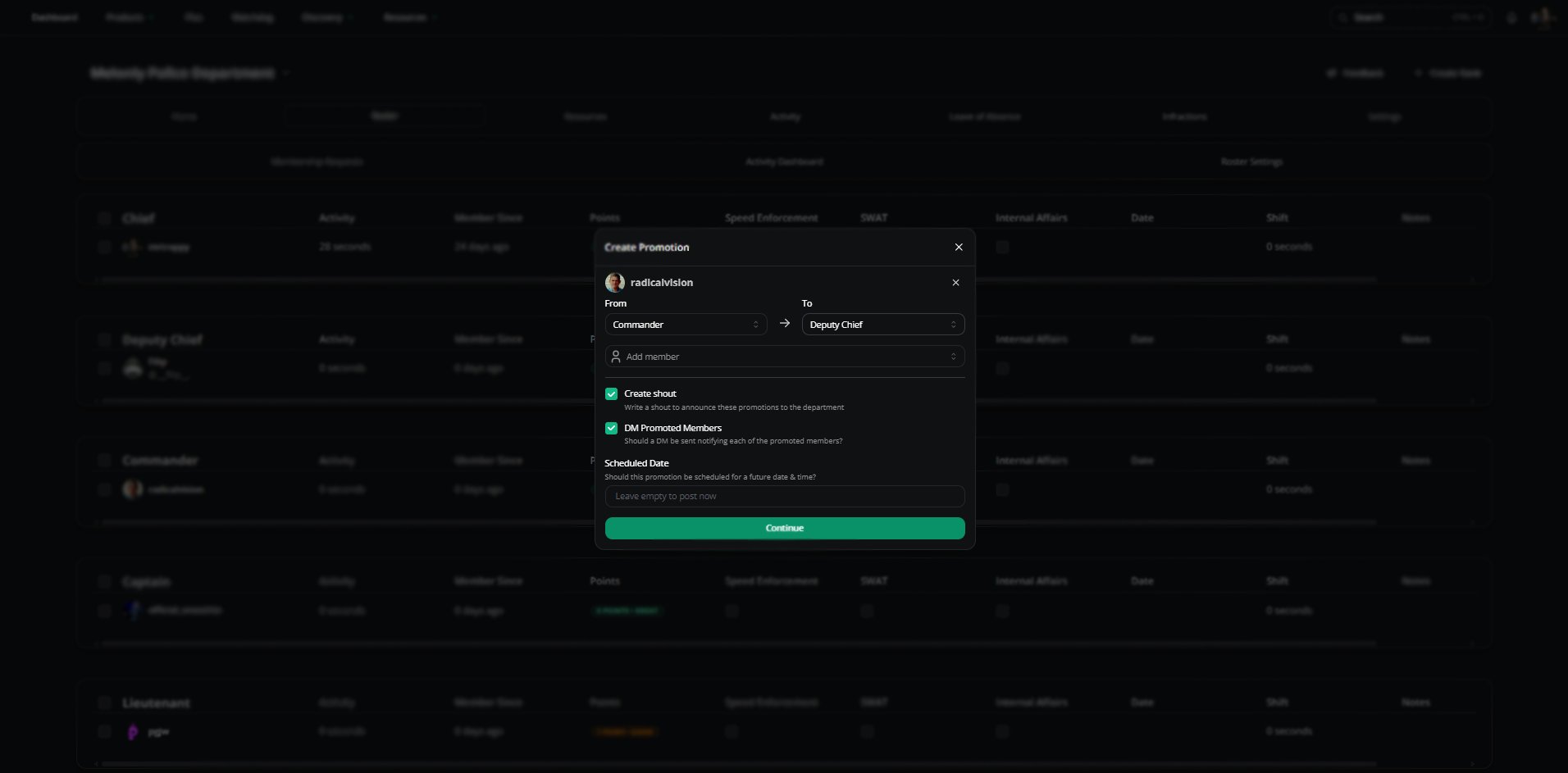 Right-click a member and choose **Promote** or **Demote**. To do several at once, select them and use **Perform action**, or open **Roster admin** and choose **Create Promotion** or **Create Demotion**.
Choose each member's new rank under **To**. It defaults to the next rank up or down.
Decide whether to post a shout and DM the members. Promotions can also be scheduled.
Click **Continue** to write the shout, or **Create Now** if you turned the shout off.
| Option | Description |
| - | - |
| To | The new rank. Promotions only list higher ranks, demotions only lower ones. |
| Add member | Adds more members to the same promotion or demotion. |
| Create shout | Posts an announcement on the department [Home page](/Department/home). On by default. |
| DM promoted / demoted members | Tells each member their new rank by DM. On by default. |
| Scheduled Date | Promotions only. Posts the promotion at a future date and time. Leave empty to promote now. |
***
## Announcement Shouts
If **Create shout** is on, you'll get a shout editor with one line per member, like "@member has been promoted to @Rank". Edit it however you like, or click **Restore Default** to start over.
***
## What Happens
When a promotion or demotion goes through:
* Each member's rank changes, and their linked Discord roles are swapped.
* Members get a DM, if you turned that on.
* A log is posted to your Promotion or Demotion Logs Channel, if set in [Discord Integration](/Department/settings/discord).
* Your shout is posted, and any workflows set to run on promotions or demotions are triggered.
***
## Scheduled Promotions
Scheduled promotions show in the shouts feed on the [Home page](/Department/home). From there you can post them now, change the date, or cancel them.
***
Still have questions? Join our Discord server for support from the Melonly Team.
This documentation is built and hosted on [Mintlify](https://mintlify.com), a developer documentation platform.
Right-click a member and choose **Promote** or **Demote**. To do several at once, select them and use **Perform action**, or open **Roster admin** and choose **Create Promotion** or **Create Demotion**.
Choose each member's new rank under **To**. It defaults to the next rank up or down.
Decide whether to post a shout and DM the members. Promotions can also be scheduled.
Click **Continue** to write the shout, or **Create Now** if you turned the shout off.
| Option | Description |
| - | - |
| To | The new rank. Promotions only list higher ranks, demotions only lower ones. |
| Add member | Adds more members to the same promotion or demotion. |
| Create shout | Posts an announcement on the department [Home page](/Department/home). On by default. |
| DM promoted / demoted members | Tells each member their new rank by DM. On by default. |
| Scheduled Date | Promotions only. Posts the promotion at a future date and time. Leave empty to promote now. |
***
## Announcement Shouts
If **Create shout** is on, you'll get a shout editor with one line per member, like "@member has been promoted to @Rank". Edit it however you like, or click **Restore Default** to start over.
***
## What Happens
When a promotion or demotion goes through:
* Each member's rank changes, and their linked Discord roles are swapped.
* Members get a DM, if you turned that on.
* A log is posted to your Promotion or Demotion Logs Channel, if set in [Discord Integration](/Department/settings/discord).
* Your shout is posted, and any workflows set to run on promotions or demotions are triggered.
***
## Scheduled Promotions
Scheduled promotions show in the shouts feed on the [Home page](/Department/home). From there you can post them now, change the date, or cancel them.
***
Still have questions? Join our Discord server for support from the Melonly Team.
This documentation is built and hosted on [Mintlify](https://mintlify.com), a developer documentation platform.