> ## Documentation Index
> Fetch the complete documentation index at: https://docs.melonly.xyz/llms.txt
> Use this file to discover all available pages before exploring further.
# Infraction Settings
> Configure expiry, guidelines, Discord roles and channels, quota points, the points system, messages, and appeals.
***
## What are Infraction Settings?
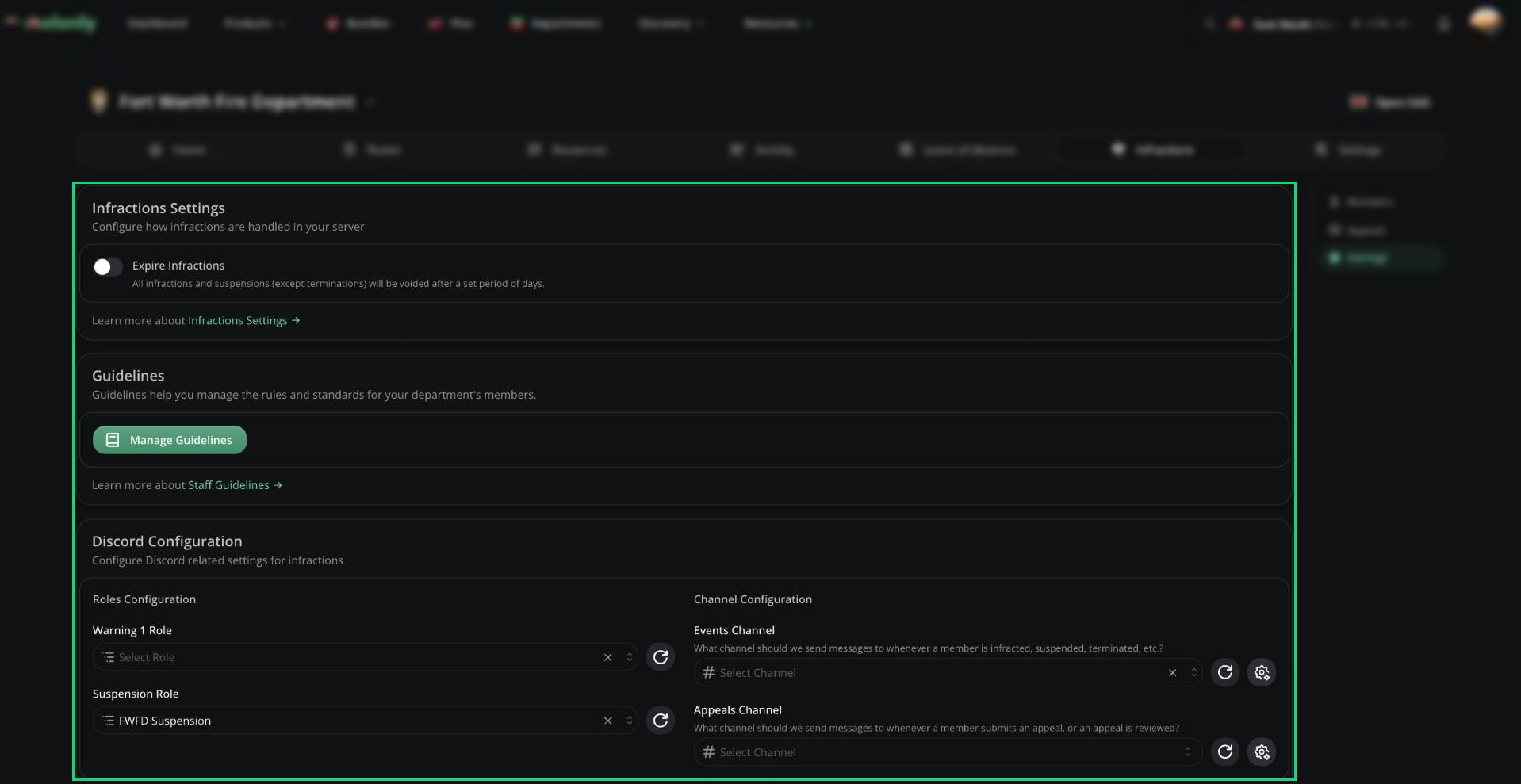
These settings decide how infractions expire, what your rules are worth, what happens as points add up, and how appeals work. They need the Infractions Administrator permission.
Changes are saved with the save bar at the bottom of the page.
 ***
## Infractions
| Setting | Description |
| - | - |
| Expire Infractions | Voids infractions and suspensions after a set time. Terminations never expire. |
| Expiry Days | Days before an infraction expires, from 7 to 365. |
***
## Department Guidelines
Guidelines are your department's rules, each with a point value. Click **Manage Guidelines** to add one with a name, short description (used as the infraction reason), optional full description, and points.
***
## Discord Configuration
Needs a [linked Discord server](/Department/settings/discord). Melonly's bot role must be above every role you pick here.
| Setting | Description |
| - | - |
| Stage roles | One role per warning stage, given when a member reaches it. Click Create roles for me to make them. |
| Suspension Role | Given to suspended members. |
| Events Channel | Where infraction, suspension, and termination messages post. |
| Appeals Channel | Where appeal submissions and decisions post. |
Use the customise button next to each channel to edit the messages posted there.
***
## Quota Settings
Gives points to members who miss their [activity](/Department/activity/waves) quota. Points are issued when an activity wave ends.
| Setting | Description |
| - | - |
| Enabled | Turns quota points on. |
| Infraction Points | Points given for a missed quota, from 0 to 1000. |
| Quota Ranks | Ranks the penalty applies to. If none are picked, nobody gets quota points. |
| Exclude members on LOA | Skips members on an approved LOA during the wave. On by default. |
| Ignore members who joined mid-wave | Skips members who joined after the wave started. On by default. |
| Adjust their quota proportionally | When not ignoring new members, scales their quota to how long they were in the department. On by default. |
***
## Points System
Stages decide what happens as points add up. Each stage has a name, a point threshold, and a type: Warning Stage, Automatic Suspension, or Automatic Termination (last stage only).
| Setting | Description |
| - | - |
| Auto-Termination | Removes a member's privileges and notifies administrators when they reach termination. |
| Auto-Suspension Days | How long automatic suspensions last. 0 means indefinite. |
Changing stages doesn't affect anyone until their next infraction.
***
## Message Customization
Edit the DMs Melonly sends for infractions, suspensions, terminations, and appeal decisions, plus the message posted when an infraction is voided. Messages support variables like the reason and points. See [Message Customization](/Dashboard/infractions/settings#message-customization).
***
## Appeals Configuration
| Setting | Description |
| - | - |
| Accepting Infraction Appeals | Lets members appeal infractions and suspensions. |
| Accepting Re-Appeals | Lets members appeal again after a denial. |
| Re-Appeal Cooldown | Days to wait before re-appealing, from 0 to 365. |
| Copy My Infractions Link | Copies the link members use to view and appeal. |
Below this, add the appeal questions members answer. Each has a name, a type (short text, long text, checkbox, number, date, or date time), an optional description, and whether it's required.
***
Still have questions? Join our Discord server for support from the Melonly Team.
This documentation is built and hosted on [Mintlify](https://mintlify.com), a developer documentation platform.
***
## Infractions
| Setting | Description |
| - | - |
| Expire Infractions | Voids infractions and suspensions after a set time. Terminations never expire. |
| Expiry Days | Days before an infraction expires, from 7 to 365. |
***
## Department Guidelines
Guidelines are your department's rules, each with a point value. Click **Manage Guidelines** to add one with a name, short description (used as the infraction reason), optional full description, and points.
***
## Discord Configuration
Needs a [linked Discord server](/Department/settings/discord). Melonly's bot role must be above every role you pick here.
| Setting | Description |
| - | - |
| Stage roles | One role per warning stage, given when a member reaches it. Click Create roles for me to make them. |
| Suspension Role | Given to suspended members. |
| Events Channel | Where infraction, suspension, and termination messages post. |
| Appeals Channel | Where appeal submissions and decisions post. |
Use the customise button next to each channel to edit the messages posted there.
***
## Quota Settings
Gives points to members who miss their [activity](/Department/activity/waves) quota. Points are issued when an activity wave ends.
| Setting | Description |
| - | - |
| Enabled | Turns quota points on. |
| Infraction Points | Points given for a missed quota, from 0 to 1000. |
| Quota Ranks | Ranks the penalty applies to. If none are picked, nobody gets quota points. |
| Exclude members on LOA | Skips members on an approved LOA during the wave. On by default. |
| Ignore members who joined mid-wave | Skips members who joined after the wave started. On by default. |
| Adjust their quota proportionally | When not ignoring new members, scales their quota to how long they were in the department. On by default. |
***
## Points System
Stages decide what happens as points add up. Each stage has a name, a point threshold, and a type: Warning Stage, Automatic Suspension, or Automatic Termination (last stage only).
| Setting | Description |
| - | - |
| Auto-Termination | Removes a member's privileges and notifies administrators when they reach termination. |
| Auto-Suspension Days | How long automatic suspensions last. 0 means indefinite. |
Changing stages doesn't affect anyone until their next infraction.
***
## Message Customization
Edit the DMs Melonly sends for infractions, suspensions, terminations, and appeal decisions, plus the message posted when an infraction is voided. Messages support variables like the reason and points. See [Message Customization](/Dashboard/infractions/settings#message-customization).
***
## Appeals Configuration
| Setting | Description |
| - | - |
| Accepting Infraction Appeals | Lets members appeal infractions and suspensions. |
| Accepting Re-Appeals | Lets members appeal again after a denial. |
| Re-Appeal Cooldown | Days to wait before re-appealing, from 0 to 365. |
| Copy My Infractions Link | Copies the link members use to view and appeal. |
Below this, add the appeal questions members answer. Each has a name, a type (short text, long text, checkbox, number, date, or date time), an optional description, and whether it's required.
***
Still have questions? Join our Discord server for support from the Melonly Team.
This documentation is built and hosted on [Mintlify](https://mintlify.com), a developer documentation platform.