> ## Documentation Index
> Fetch the complete documentation index at: https://docs.melonly.xyz/llms.txt
> Use this file to discover all available pages before exploring further.
# Converting a Server
> Turn an existing Melonly server into a department under a parent server.
***
## What is Converting?
If you already run a team as its own Melonly server, you can turn it into a department under your main server. Its members, roles and most data come with it, and the old server is removed.
You need to be the owner or an Administrator of both the server you're converting and the parent server.
***
## Convert a Server
On the server you want to convert, open **Settings**, scroll to **Convert To a Department** and click **Convert now**.
The name and Discord server are filled in for you. Upload an icon, pick the parent server and click **Continue**.
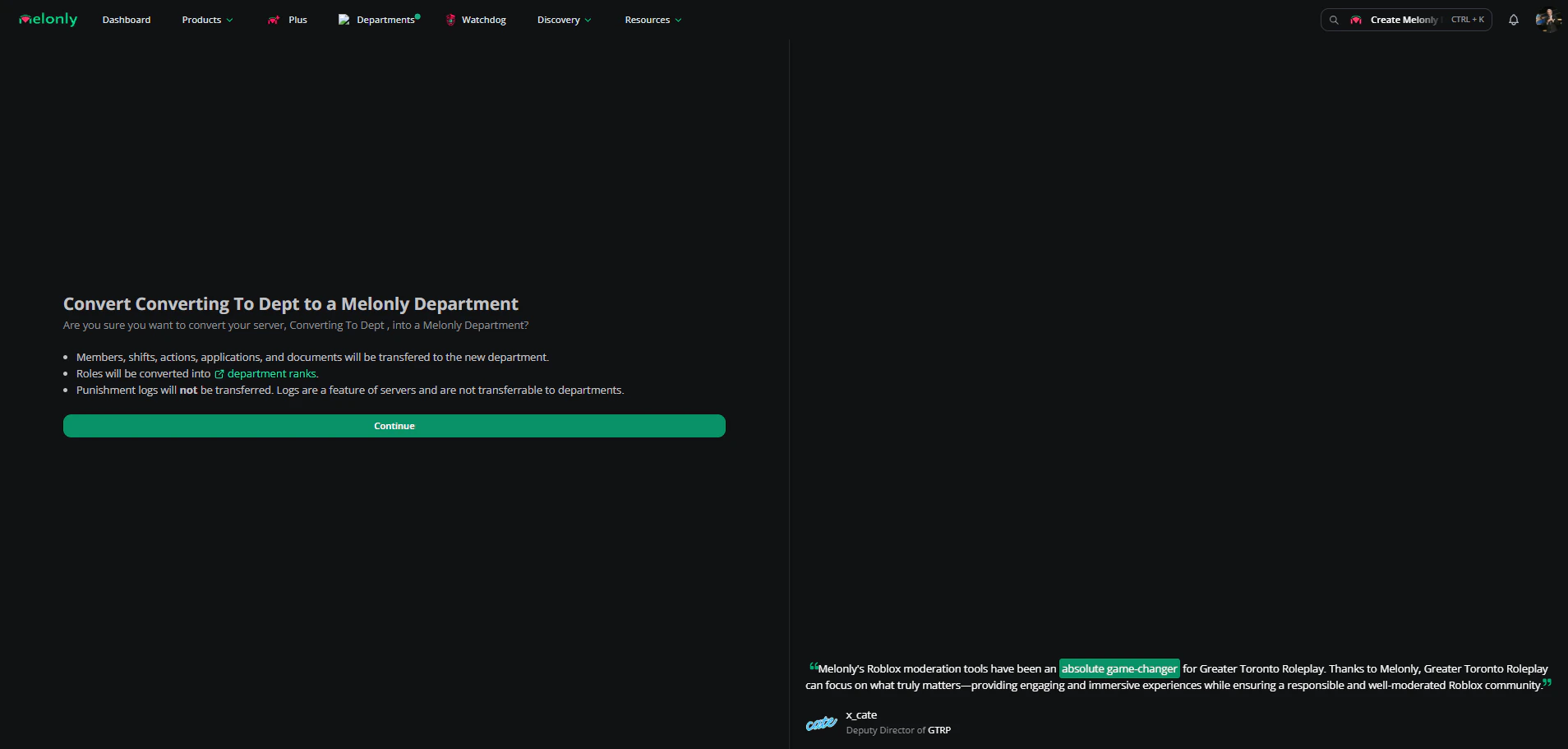
Read the summary, then confirm.
If the parent server has no free slot, you'll be asked to buy and activate a plan first. See [Plans & Billing](/Department/plans).
You land on the new department's Home page.
 ***
## What Transfers
| Item | Details |
| - | - |
| Members | Everyone moves across. You're added too if you weren't a member. |
| Roles | Become ranks in the same order, with their names, colours, linked Discord roles and matching permissions. Each member gets the rank for their highest role. |
| Shifts and activity | Shifts and activity settings move across. |
| Actions | Move across. |
| Applications and documents | Move across, including folders. |
| Join code | Stays the same, so existing links keep working. |
| Settings | On-shift, on-break and LOA roles, shift log channel, LOA settings, audit log channel, nickname prefixes, Discord autokick and the wave end channel. |
Members with no role are placed in the first rank on the list, so check the roster afterwards.
***
## What Doesn't Transfer
| Item | Details |
| - | - |
| Punishment logs | These are a server feature and stay behind. |
| Pending join requests | Removed. People need to request again. |
| The old server | Deleted after conversion, along with its roles. |
| Subscriptions | Plus, Watchdog, Departments and Vision subscriptions are detached. Activate them on another server from Manage subscriptions. |
Converting can't be undone, and the parent server can't be changed afterwards.
***
Still have questions? Join our Discord server for support from the Melonly Team.
This documentation is built and hosted on [Mintlify](https://mintlify.com), a developer documentation platform.
***
## What Transfers
| Item | Details |
| - | - |
| Members | Everyone moves across. You're added too if you weren't a member. |
| Roles | Become ranks in the same order, with their names, colours, linked Discord roles and matching permissions. Each member gets the rank for their highest role. |
| Shifts and activity | Shifts and activity settings move across. |
| Actions | Move across. |
| Applications and documents | Move across, including folders. |
| Join code | Stays the same, so existing links keep working. |
| Settings | On-shift, on-break and LOA roles, shift log channel, LOA settings, audit log channel, nickname prefixes, Discord autokick and the wave end channel. |
Members with no role are placed in the first rank on the list, so check the roster afterwards.
***
## What Doesn't Transfer
| Item | Details |
| - | - |
| Punishment logs | These are a server feature and stay behind. |
| Pending join requests | Removed. People need to request again. |
| The old server | Deleted after conversion, along with its roles. |
| Subscriptions | Plus, Watchdog, Departments and Vision subscriptions are detached. Activate them on another server from Manage subscriptions. |
Converting can't be undone, and the parent server can't be changed afterwards.
***
Still have questions? Join our Discord server for support from the Melonly Team.
This documentation is built and hosted on [Mintlify](https://mintlify.com), a developer documentation platform.