> ## Documentation Index
> Fetch the complete documentation index at: https://docs.melonly.xyz/llms.txt
> Use this file to discover all available pages before exploring further.
# Activity Waves
> Set how long activity waves last, the hours members need each wave, and when members are flagged inactive.
***
## What are Activity Waves?
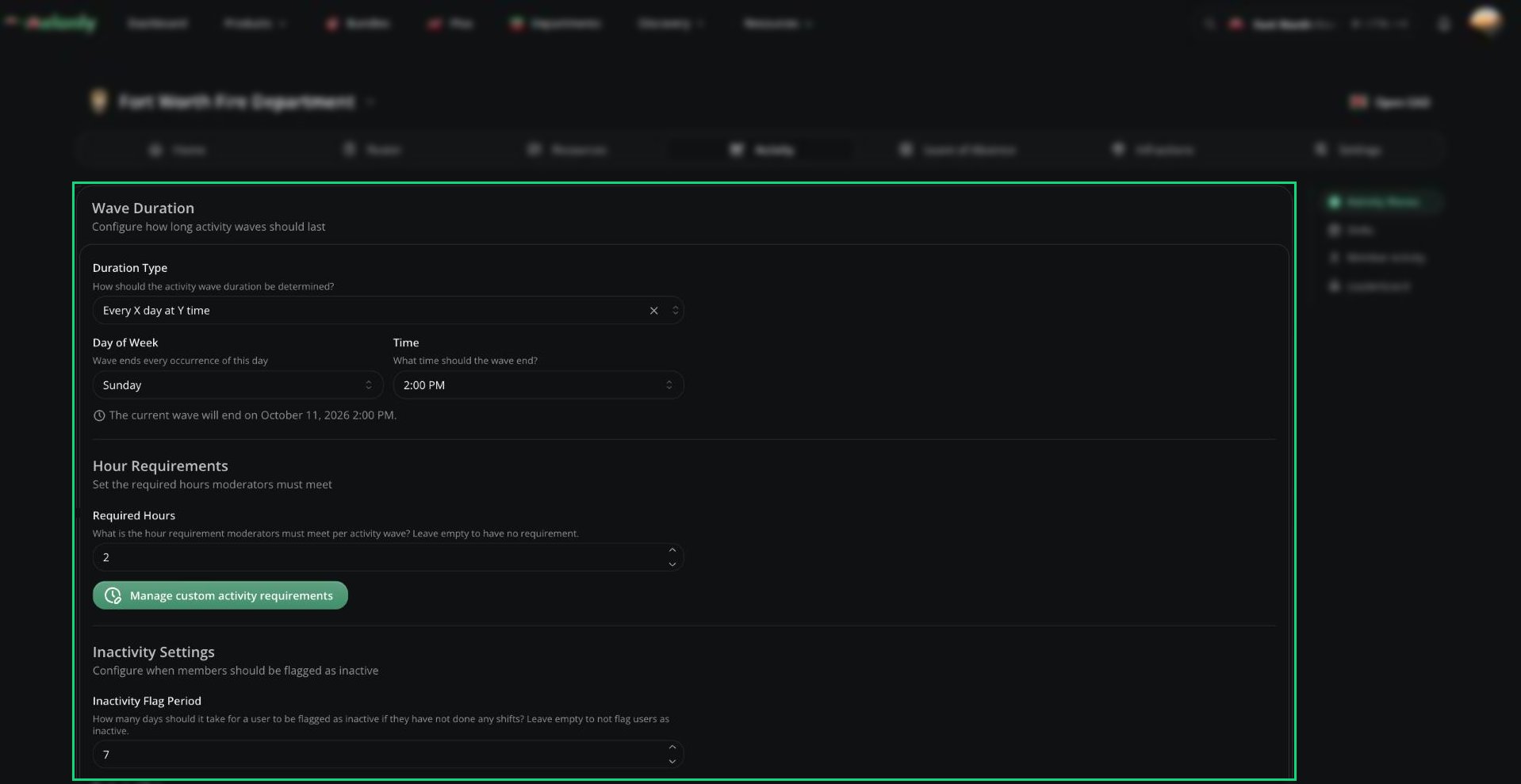
An activity wave is a set period, like a week or a month, that has its own hour quota. Only one wave runs at a time. When it ends, its results are saved and the next one starts straight away.
Click **Save** after changing anything on this page.
 ***
## Wave Duration
Pick a Duration Type to decide when waves end. Clear it to stop waves ending on their own.
| Duration Type | When the wave ends |
| - | - |
| Duration in days | After a set number of days (up to 60) |
| End of month | At the end of each month (UTC) |
| End of week | Every Saturday at midnight (UTC) |
| End of every other week | Every other Saturday at midnight (UTC) |
| Every X day at Y time | On the day of the week and time you choose |
| Every other X day at Y time | Every other week, on the day and time you choose |
If the current wave has already passed the new duration, saving ends it straight away.
***
## Hour Requirements and Inactivity
| Setting | Description |
| - | - |
| Required Hours | Hours each member must reach per wave. Leave empty for no quota. |
| Custom activity requirements | A different hour requirement per rank. Overrides Required Hours for that rank. |
| Inactivity Flag Period | Days without a shift before a member is flagged inactive. Leave empty to turn off. |
| Excluded Roles | Ranks that are never flagged inactive |
| Inactivity Channel | Discord channel for inactivity notices. Needs a linked Discord server. |
| Variable | Description |
| - | - |
| `{user}` | The inactive member |
| `{mentionuser}` | Mentions the inactive member |
| `{period}` | The inactivity period in days |
| `{lastShift}` | When their last shift was, or "never" |
| `{wave}` | The current wave number |
***
## Managing Waves
The waves table lists every wave with its shifts and online time. From the current wave you can:
* **End wave** early.
* **Set End Date** to pick an exact end for this wave only.
* **Delete activity wave** to remove a wave and all its shifts. Deleting the current wave restarts it from zero.
When you end a wave and automatic [quota infractions](/Department/infraction/settings#quota-settings) are on, Melonly asks whether to exclude members on LOA and members who joined mid-wave, then shows who will get an infraction before you confirm. Waves that end on their own use the Scheduled Wave Ends defaults from the same settings.
***
## Related
* [Shifts](/Department/activity/shifts) for how time is logged during a wave.
* [Member Activity & Leaderboard](/Department/activity/members) to see who met the quota.
***
Still have questions? Join our Discord server for support from the Melonly Team.
This documentation is built and hosted on [Mintlify](https://mintlify.com), a developer documentation platform.
***
## Wave Duration
Pick a Duration Type to decide when waves end. Clear it to stop waves ending on their own.
| Duration Type | When the wave ends |
| - | - |
| Duration in days | After a set number of days (up to 60) |
| End of month | At the end of each month (UTC) |
| End of week | Every Saturday at midnight (UTC) |
| End of every other week | Every other Saturday at midnight (UTC) |
| Every X day at Y time | On the day of the week and time you choose |
| Every other X day at Y time | Every other week, on the day and time you choose |
If the current wave has already passed the new duration, saving ends it straight away.
***
## Hour Requirements and Inactivity
| Setting | Description |
| - | - |
| Required Hours | Hours each member must reach per wave. Leave empty for no quota. |
| Custom activity requirements | A different hour requirement per rank. Overrides Required Hours for that rank. |
| Inactivity Flag Period | Days without a shift before a member is flagged inactive. Leave empty to turn off. |
| Excluded Roles | Ranks that are never flagged inactive |
| Inactivity Channel | Discord channel for inactivity notices. Needs a linked Discord server. |
| Variable | Description |
| - | - |
| `{user}` | The inactive member |
| `{mentionuser}` | Mentions the inactive member |
| `{period}` | The inactivity period in days |
| `{lastShift}` | When their last shift was, or "never" |
| `{wave}` | The current wave number |
***
## Managing Waves
The waves table lists every wave with its shifts and online time. From the current wave you can:
* **End wave** early.
* **Set End Date** to pick an exact end for this wave only.
* **Delete activity wave** to remove a wave and all its shifts. Deleting the current wave restarts it from zero.
When you end a wave and automatic [quota infractions](/Department/infraction/settings#quota-settings) are on, Melonly asks whether to exclude members on LOA and members who joined mid-wave, then shows who will get an infraction before you confirm. Waves that end on their own use the Scheduled Wave Ends defaults from the same settings.
***
## Related
* [Shifts](/Department/activity/shifts) for how time is logged during a wave.
* [Member Activity & Leaderboard](/Department/activity/members) to see who met the quota.
***
Still have questions? Join our Discord server for support from the Melonly Team.
This documentation is built and hosted on [Mintlify](https://mintlify.com), a developer documentation platform.