> ## Documentation Index
> Fetch the complete documentation index at: https://docs.melonly.xyz/llms.txt
> Use this file to discover all available pages before exploring further.
# Shifts
> Clock in and out, set shift limits, create shift types, and manage your department's shifts.
***
## What are Shifts?
A shift is a block of time a member spends on duty. Shift time counts towards the member's quota in the current [activity wave](/Department/activity/waves).
 ***
## Clocking In
Members can start and end shifts from:
* The department [Home](/Department/home) page, with **Start Shift**. If you have shift types, they pick one first. The shift report form opens when they end the shift.
* Melonly CAD, from the **Activity** menu. A CAD shift ends automatically when they leave the panel. If [Require Clock-In](/CAD/Admin/config#general-settings) is on, the CAD stays locked until they clock in.
* In-game teams, if you set up [ER:LC shift automation](/Department/settings/erlc).
A member can only have one shift running at a time. A shift won't start if Max On Shift is reached, the member is on LOA and [Disallow Shifts on Leave of Absence](/Department/loa/settings#general) is on, or they don't have a rank the shift type requires.
***
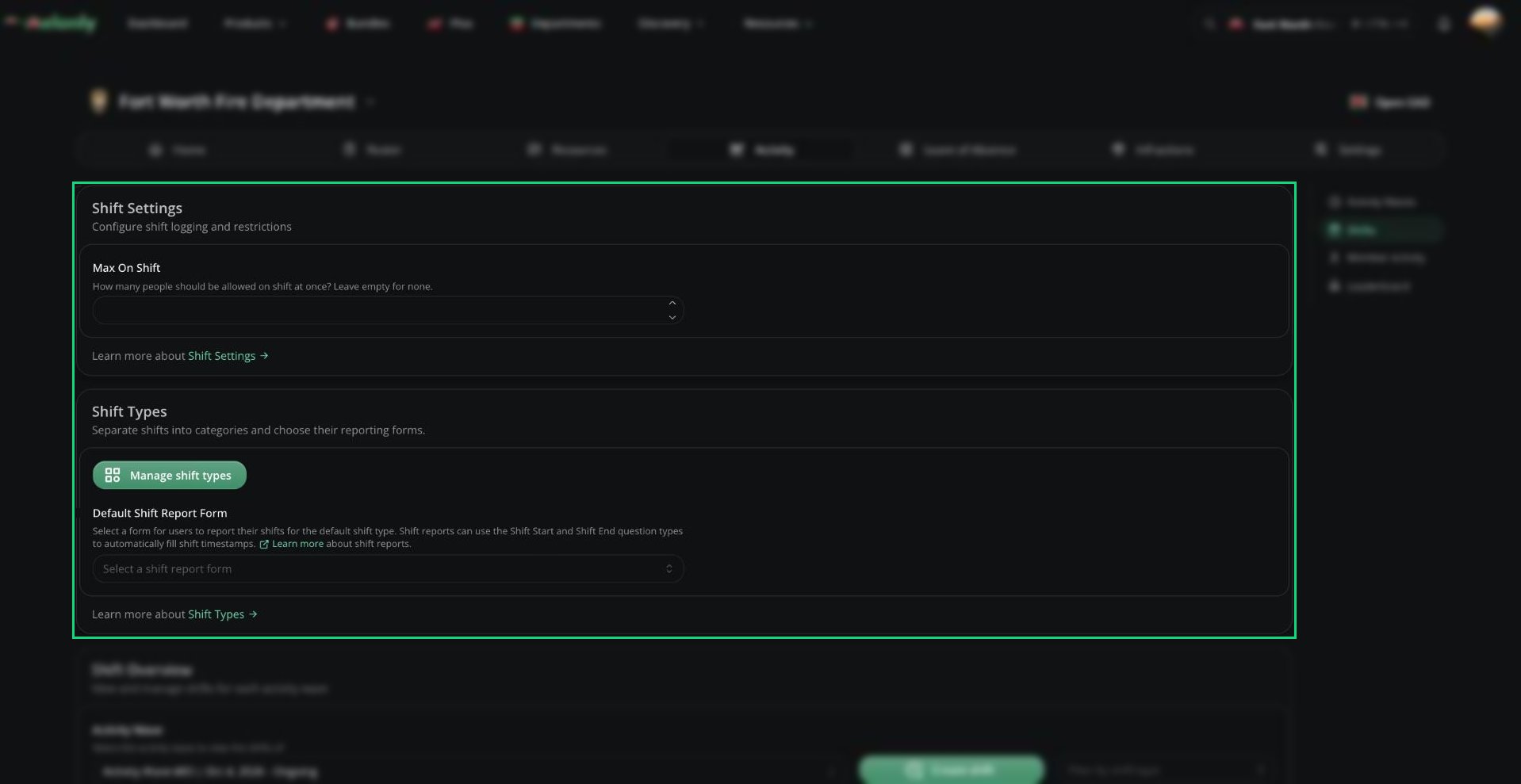
## Shift Settings
| Setting | Description |
| - | - |
| Max On Shift | How many people can be on shift at once, including administrators. Leave empty for no limit. |
***
## Shift Types
Shift types split shifts into categories, like Patrol or Training. Click **Manage shift types** to add, edit or delete them.
| Field | Description |
| - | - |
| Name | The shift type's name. Must be unique. |
| Required Ranks / Roles | Members need one of these to start this type. Leave empty for no restriction. |
| On Shift Role | Discord role given during this type of shift, instead of the default. Needs a linked Discord server. |
| Shift Report Form | The form members fill in after a shift of this type |
When you delete a type, its shifts move to the default type unless you tick **Delete related shifts**.
***
## Default Shift Report Form
The form members fill in after a shift with no shift type. Create forms on the [Resources](/Department/Resources) page first. Use the Shift Start and Shift End question types to fill in the shift's times automatically.
***
## Shift Overview
Lists every shift in the selected wave. You can filter by shift type, and click **Create shift** to log one manually, for example when someone forgot to clock in.
From a shift's menu you can view its report, edit its times or type, or delete it. You can't edit or delete ongoing shifts, or shifts of members at or above your rank.
Melonly generates a report for shifts of at least 5 minutes, showing how many actions were run. Reports aren't available for shifts that ended more than 7 days ago.
***
Still have questions? Join our Discord server for support from the Melonly Team.
This documentation is built and hosted on [Mintlify](https://mintlify.com), a developer documentation platform.
***
## Clocking In
Members can start and end shifts from:
* The department [Home](/Department/home) page, with **Start Shift**. If you have shift types, they pick one first. The shift report form opens when they end the shift.
* Melonly CAD, from the **Activity** menu. A CAD shift ends automatically when they leave the panel. If [Require Clock-In](/CAD/Admin/config#general-settings) is on, the CAD stays locked until they clock in.
* In-game teams, if you set up [ER:LC shift automation](/Department/settings/erlc).
A member can only have one shift running at a time. A shift won't start if Max On Shift is reached, the member is on LOA and [Disallow Shifts on Leave of Absence](/Department/loa/settings#general) is on, or they don't have a rank the shift type requires.
***
## Shift Settings
| Setting | Description |
| - | - |
| Max On Shift | How many people can be on shift at once, including administrators. Leave empty for no limit. |
***
## Shift Types
Shift types split shifts into categories, like Patrol or Training. Click **Manage shift types** to add, edit or delete them.
| Field | Description |
| - | - |
| Name | The shift type's name. Must be unique. |
| Required Ranks / Roles | Members need one of these to start this type. Leave empty for no restriction. |
| On Shift Role | Discord role given during this type of shift, instead of the default. Needs a linked Discord server. |
| Shift Report Form | The form members fill in after a shift of this type |
When you delete a type, its shifts move to the default type unless you tick **Delete related shifts**.
***
## Default Shift Report Form
The form members fill in after a shift with no shift type. Create forms on the [Resources](/Department/Resources) page first. Use the Shift Start and Shift End question types to fill in the shift's times automatically.
***
## Shift Overview
Lists every shift in the selected wave. You can filter by shift type, and click **Create shift** to log one manually, for example when someone forgot to clock in.
From a shift's menu you can view its report, edit its times or type, or delete it. You can't edit or delete ongoing shifts, or shifts of members at or above your rank.
Melonly generates a report for shifts of at least 5 minutes, showing how many actions were run. Reports aren't available for shifts that ended more than 7 days ago.
***
Still have questions? Join our Discord server for support from the Melonly Team.
This documentation is built and hosted on [Mintlify](https://mintlify.com), a developer documentation platform.