> ## Documentation Index
> Fetch the complete documentation index at: https://docs.melonly.xyz/llms.txt
> Use this file to discover all available pages before exploring further.
# Reminders
> Create automated reminders and ER:LC actions for your server.
***
## What are Reminders?
Reminders allow you to automate messages and actions for your server.\
You can send scheduled messages, prompt staff to complete tasks, and integrate reminders directly into ER:LC.
Reminders only run when at least one staff member is on shift.\
This prevents unnecessary messages when the server is inactive.
***
## Server Reminders
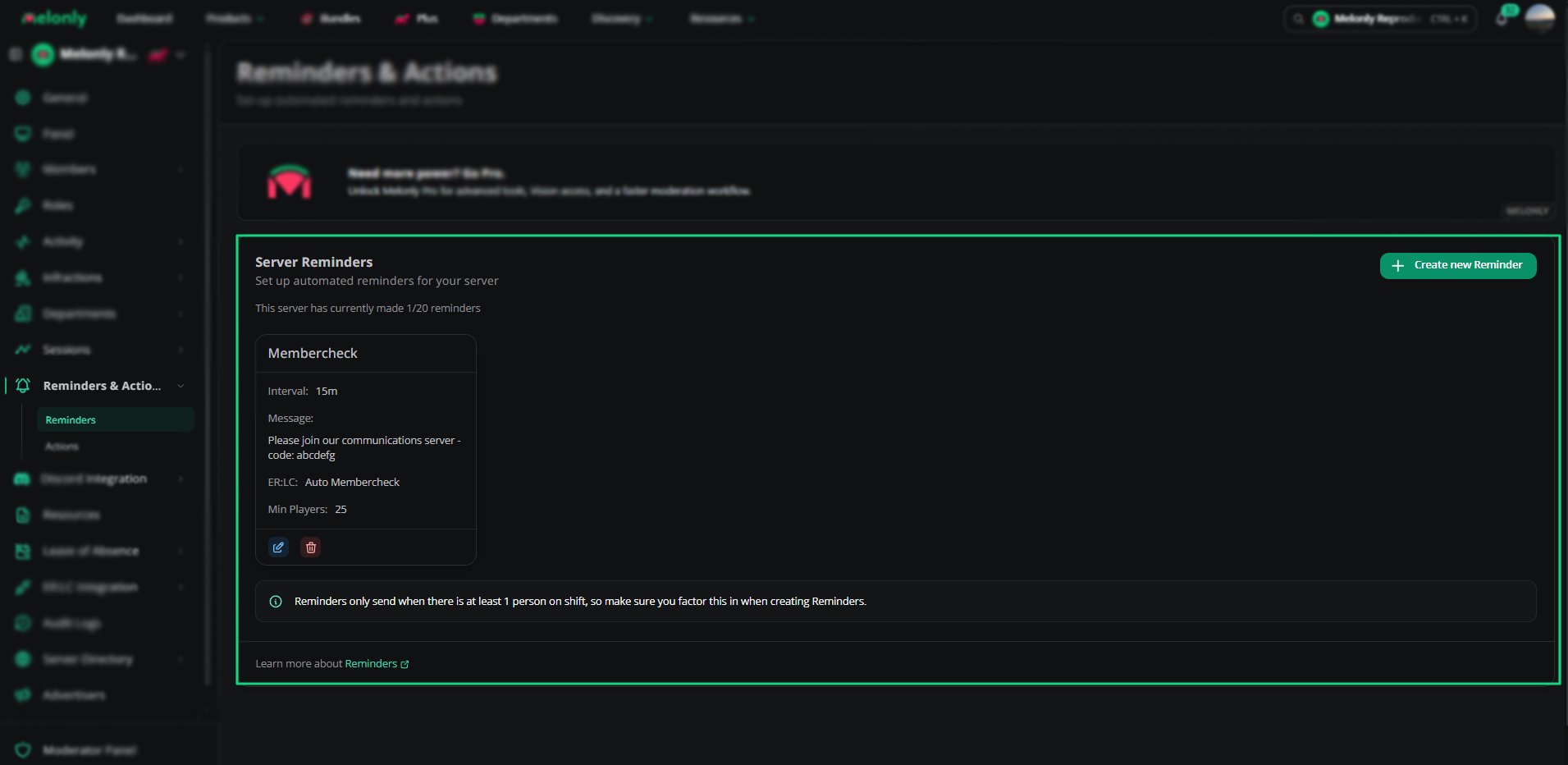 The Reminders page shows all active reminders for your server.\
Each reminder displays:
* Interval
* Message
* Linked action
* ER:LC integration type
* Minimum ER:LC players
* Edit and delete options
You can create up to 20 reminders.
***
## Creating a Reminder
The Reminders page shows all active reminders for your server.\
Each reminder displays:
* Interval
* Message
* Linked action
* ER:LC integration type
* Minimum ER:LC players
* Edit and delete options
You can create up to 20 reminders.
***
## Creating a Reminder
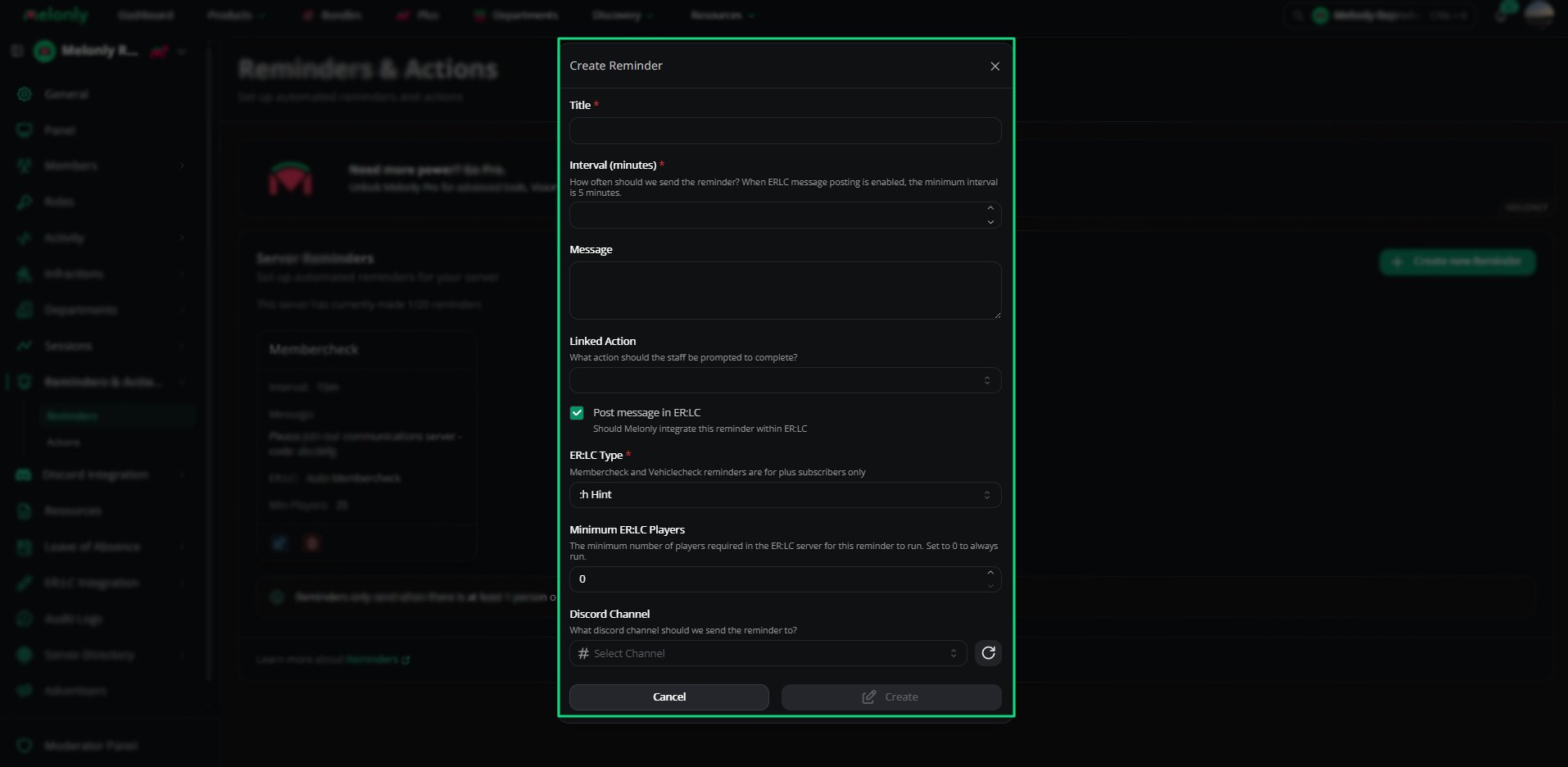 Give your reminder a clear name so staff know what it does.
Choose how often the reminder should run.\
The minimum interval is 5 minutes.
This is the message that will be sent to the selected Discord channel or in your private server.
Select the action staff should complete when the reminder runs.
Leave Blank if you do not wish to link an action.
If enabled, the reminder will also run inside ER:LC.
Choose the ER:LC command type.\
Membercheck and Vehiclecheck reminders require Melonly Plus.
Choose how many players must be in the server for the reminder to run.\
Set to 0 to always run.
Select the channel where the reminder message will be sent.
***
## ER:LC Integration
ER:LC reminders allow you to run automated in‑game actions.\
Available types include:
* :h Hint
* :m Announcement
* :pm Membercheck (Plus only)
* :pm Vehiclecheck (Plus only)
* :pm & :load Membercheck (Plus only)
* :pm & :load Vehiclecheck (Plus only)
These actions help automate routine checks and communication inside ER:LC.
***
## Reminder Requirements
* Reminders only run when at least one staff member is on shift.
* ER:LC reminders require your server to be connected to Melonly.
* Membercheck and Vehiclecheck reminders require Melonly Plus.
***
Still have questions? Join our Discord server for support from the Melonly Team.
Give your reminder a clear name so staff know what it does.
Choose how often the reminder should run.\
The minimum interval is 5 minutes.
This is the message that will be sent to the selected Discord channel or in your private server.
Select the action staff should complete when the reminder runs.
Leave Blank if you do not wish to link an action.
If enabled, the reminder will also run inside ER:LC.
Choose the ER:LC command type.\
Membercheck and Vehiclecheck reminders require Melonly Plus.
Choose how many players must be in the server for the reminder to run.\
Set to 0 to always run.
Select the channel where the reminder message will be sent.
***
## ER:LC Integration
ER:LC reminders allow you to run automated in‑game actions.\
Available types include:
* :h Hint
* :m Announcement
* :pm Membercheck (Plus only)
* :pm Vehiclecheck (Plus only)
* :pm & :load Membercheck (Plus only)
* :pm & :load Vehiclecheck (Plus only)
These actions help automate routine checks and communication inside ER:LC.
***
## Reminder Requirements
* Reminders only run when at least one staff member is on shift.
* ER:LC reminders require your server to be connected to Melonly.
* Membercheck and Vehiclecheck reminders require Melonly Plus.
***
Still have questions? Join our Discord server for support from the Melonly Team.