> ## Documentation Index
> Fetch the complete documentation index at: https://docs.melonly.xyz/llms.txt
> Use this file to discover all available pages before exploring further.
# Mass Command Alerts
> Alert staff when dangerous commands are ran.
***
## What are Mass Command Alerts?
Mass Command Alerts notify your team when a moderation command affects multiple players at once.\
This helps staff monitor large scale actions and prevents accidental mass punishments.
Mass Command Alerts are ideal for commands that can impact many users such as `:ban all`, `:kick others`, `:mod`, and `:unmod`.
***
# Configuration Options
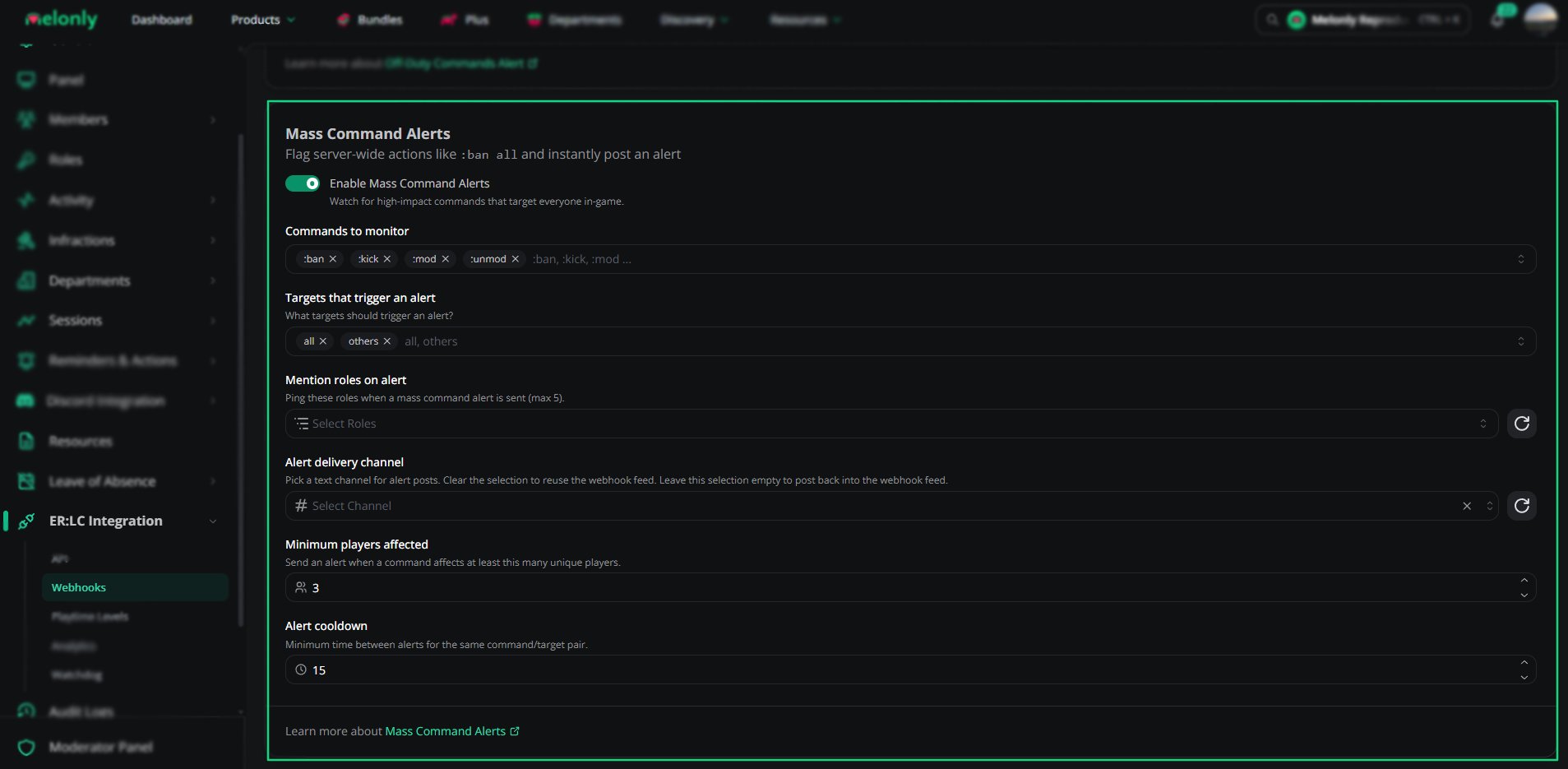 | Setting | Description |
| ----------------------- | --------------------------------------------------------------------------- |
| **Enable Mass Alerts** | Master toggle to enable or disable mass command alerts. |
| **Commands to Monitor** | Which commands trigger alerts (example: `:ban`, `:kick`, `:mod`, `:unmod`). |
| **Targets** | Which targets trigger alerts (example: `all`, `others`). |
| **Minimum Players** | Minimum number of affected players required to trigger an alert. |
| **Alert Cooldown** | Minimum time between alerts in minutes to prevent spam. |
| **Mention Roles** | Up to 5 roles to ping when an alert is posted. |
| **Alert Channel** | Discord channel where alerts will be posted. |
***
## How Mass Alerts Work
Turn on the master toggle to start monitoring configured commands.
Choose which commands should be monitored and which target types count toward the threshold.
Define how many affected players are required before an alert is triggered.
Select the channel where alerts will post and which roles should be pinged.
Set a cooldown to avoid repeated alerts during rapid moderation activity.
***
## Example Scenarios
* **Monitor mass kicks after a server incident** - Notify supervisors when `:kick` targets many players.
* **Track mass role changes** - Alert when `:mod` or `:unmod` affects multiple users to ensure role changes were intentional.
* **Reduce noise** - Use allowed commands and allowed roles to exempt harmless actions and trusted staff.
***
Still have questions? Join our Discord server for support from the Melonly Team.
| Setting | Description |
| ----------------------- | --------------------------------------------------------------------------- |
| **Enable Mass Alerts** | Master toggle to enable or disable mass command alerts. |
| **Commands to Monitor** | Which commands trigger alerts (example: `:ban`, `:kick`, `:mod`, `:unmod`). |
| **Targets** | Which targets trigger alerts (example: `all`, `others`). |
| **Minimum Players** | Minimum number of affected players required to trigger an alert. |
| **Alert Cooldown** | Minimum time between alerts in minutes to prevent spam. |
| **Mention Roles** | Up to 5 roles to ping when an alert is posted. |
| **Alert Channel** | Discord channel where alerts will be posted. |
***
## How Mass Alerts Work
Turn on the master toggle to start monitoring configured commands.
Choose which commands should be monitored and which target types count toward the threshold.
Define how many affected players are required before an alert is triggered.
Select the channel where alerts will post and which roles should be pinged.
Set a cooldown to avoid repeated alerts during rapid moderation activity.
***
## Example Scenarios
* **Monitor mass kicks after a server incident** - Notify supervisors when `:kick` targets many players.
* **Track mass role changes** - Alert when `:mod` or `:unmod` affects multiple users to ensure role changes were intentional.
* **Reduce noise** - Use allowed commands and allowed roles to exempt harmless actions and trusted staff.
***
Still have questions? Join our Discord server for support from the Melonly Team.