> ## Documentation Index
> Fetch the complete documentation index at: https://docs.melonly.xyz/llms.txt
> Use this file to discover all available pages before exploring further.
# Playtime Levels
> Reward players for reaching playtime milestones with roles, perks, and level up notifications.
## What are Playtime Levels?
Playtime Levels allow you to reward players for spending time in your ERLC server.\
Each level can unlock Discord roles and perks.
Players progress automatically as they reach the required playtime milestones.
Playtime Levels help encourage activity, reward loyal players, and create long term progression inside your community.
***
## How to use Playtime Levels
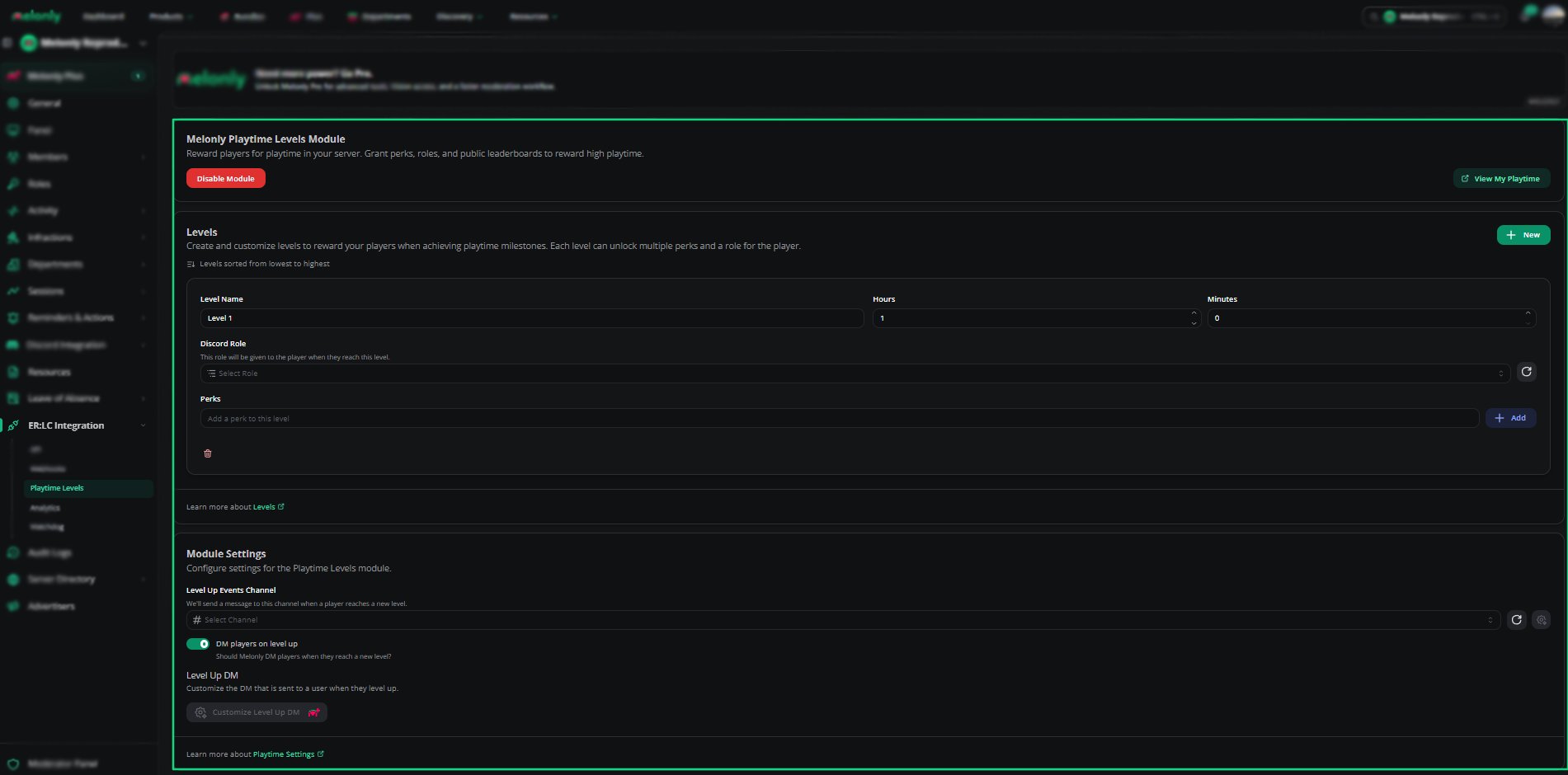
You can configure **Playtime Levels** from your\
**ERLC Integration → Playtime Levels** page
### Module Controls
Turn the module on or off.\
When enabled, Melonly will begin tracking player playtime and awarding levels.
Allows you to view your own playtime directly from the dashboard.
Turns off all playtime tracking and level rewards.
***
## Creating and Managing Levels
Levels are sorted from lowest to highest.\
Each level can include a name, required playtime, an optional Discord role, and up to 10 perks.
### Level Fields
| Field | Description |
| ----------------- | --------------------------------------------------------------------- |
| Level Name | 1–50 characters. Example: Bronze Player. |
| Required Playtime | Minimum playtime needed to reach the level. Min 1 minute, max 1 year. |
| Discord Role | Optional role granted when the player reaches this level. |
| Perks | Up to 10 perks per level, 100 characters each. |
### Level Actions
| Action | Description |
| -------------- | -------------------------------------------------------------- |
| Reorder Levels | Reorder the level list. Levels must remain in ascending order. |
| Remove Levels | Delete a level. |
| Add Perks | Add perks to a level. |
 ***
## Notifications
Playtime Levels support both channel notifications and direct messages.
| Setting | Description |
| ----------------------- | ----------------------------------------------------------------------- |
| Level Up Events Channel | Channel where level up messages are posted. |
| Custom Level Up Message | Custom channel message. Supports `{user}`, `{level}`, `{playtime}`. |
| DM Players on Level Up | Sends a DM to the player when they level up. |
| Custom Level Up DM | Custom DM template. Supports the same variables. Requires Melonly Plus. |
Customizing the level up DM requires Melonly Plus. You can find out more about what Plus offers [**here**](https://melonly.xyz/plus?referer=page_header_pc)
***
## Module Settings
Select the channel where Melonly will post level up messages.
Enable this to send players a direct message when they reach a new level.
Create a custom DM template using variables such as `{user}`, `{level}`, and `{playtime}`.\
This feature requires Melonly Plus.
***
## Example Use Cases
* Reward active players with special roles
* Create a progression system for long term engagement
* Offer perks such as in game benefits or Discord privileges
* Celebrate milestones with automated level up messages
* Build a leaderboard of top playtime earners
***
Still have questions? Join our Discord server for support from the Melonly Team.
***
## Notifications
Playtime Levels support both channel notifications and direct messages.
| Setting | Description |
| ----------------------- | ----------------------------------------------------------------------- |
| Level Up Events Channel | Channel where level up messages are posted. |
| Custom Level Up Message | Custom channel message. Supports `{user}`, `{level}`, `{playtime}`. |
| DM Players on Level Up | Sends a DM to the player when they level up. |
| Custom Level Up DM | Custom DM template. Supports the same variables. Requires Melonly Plus. |
Customizing the level up DM requires Melonly Plus. You can find out more about what Plus offers [**here**](https://melonly.xyz/plus?referer=page_header_pc)
***
## Module Settings
Select the channel where Melonly will post level up messages.
Enable this to send players a direct message when they reach a new level.
Create a custom DM template using variables such as `{user}`, `{level}`, and `{playtime}`.\
This feature requires Melonly Plus.
***
## Example Use Cases
* Reward active players with special roles
* Create a progression system for long term engagement
* Offer perks such as in game benefits or Discord privileges
* Celebrate milestones with automated level up messages
* Build a leaderboard of top playtime earners
***
Still have questions? Join our Discord server for support from the Melonly Team.