> ## Documentation Index
> Fetch the complete documentation index at: https://docs.melonly.xyz/llms.txt
> Use this file to discover all available pages before exploring further.
# Creating a Unit
> Create a unit with your callsign, agency and equipment, then go on duty on a CAD panel.
***
## What is a Unit?
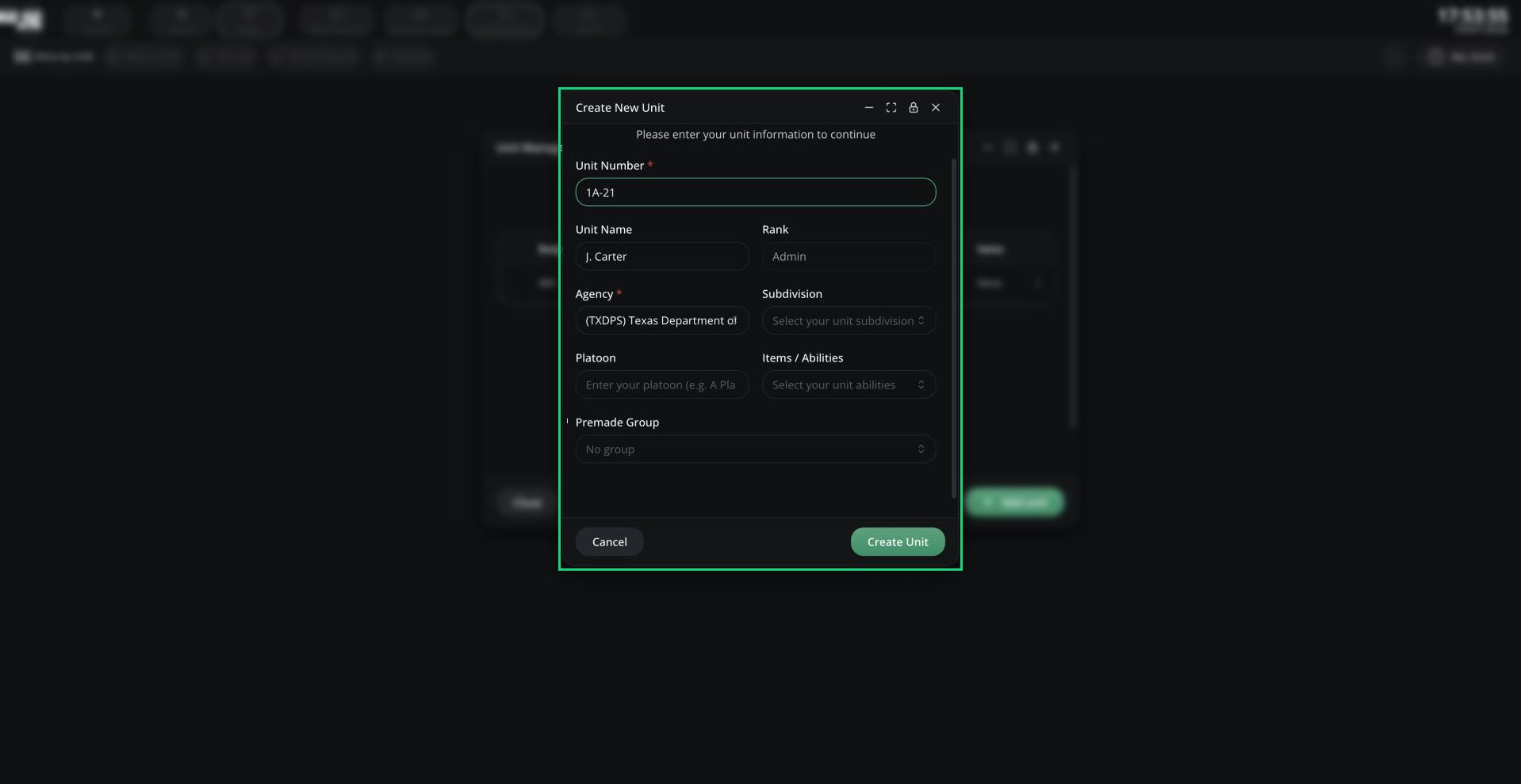
A unit is your on-duty identity in the CAD: your callsign, roleplay name, rank, agency and equipment. You need an active unit before you can use the Police, Fire, EMS, DOT or Dispatch panels.
 ***
## Creating a Unit
Click **Create Unit** (or **Select Unit**) in the middle of the panel, or click the unit chip in the top bar.
Click **Add unit**, fill in the form and click **Create Unit**.
Click the unit's row to log in as it. Click it again to log out.
Your last unit on each panel is remembered on your device and rejoined next time. Use the ⋮ menu on a row to edit or delete a unit.
If **Add unit** is greyed out, your server has no agencies on this panel you can use. Agencies are set up by admins in [Customization](/CAD/Admin/customization#agencies). An agency linked to a department is only available if you're in that department.
***
## Unit Fields
| Field | Description |
| - | - |
| Unit Number | Required. Your callsign, for example 5F-407. |
| Unit Name | Your roleplay name |
| Rank | Your rank. Filled in and locked if the agency is linked to a department you hold a rank in. |
| Agency | Required. Only agencies allowed on this panel are listed. |
| Subdivision | One of the agency's subdivisions |
| Platoon | Free text, for example A Platoon |
| Items / Abilities | The agency's equipment, such as Hose or AED |
| Premade Group | Optionally put the unit straight into a [premade group](/CAD/User/units/groups#premade-groups) |
***
## Joining a Panel
Your server can add extra checks before you go on duty:
* Some panels only accept units from certain agencies.
* You may need to be clocked in. Open the CAD menu, go to **Activity** and start a shift first. Shifts started from the CAD end when you leave the panel.
* You may need a live bodycam first. See [Bodycam](/CAD/User/radio/bodycam).
Dispatchers, supervisors and CAD admins can fix another unit's details by right-clicking it and choosing **Edit identifier**.
***
Still have questions? Join our Discord server for support from the Melonly Team.
This documentation is built and hosted on [Mintlify](https://mintlify.com), a developer documentation platform.
***
## Creating a Unit
Click **Create Unit** (or **Select Unit**) in the middle of the panel, or click the unit chip in the top bar.
Click **Add unit**, fill in the form and click **Create Unit**.
Click the unit's row to log in as it. Click it again to log out.
Your last unit on each panel is remembered on your device and rejoined next time. Use the ⋮ menu on a row to edit or delete a unit.
If **Add unit** is greyed out, your server has no agencies on this panel you can use. Agencies are set up by admins in [Customization](/CAD/Admin/customization#agencies). An agency linked to a department is only available if you're in that department.
***
## Unit Fields
| Field | Description |
| - | - |
| Unit Number | Required. Your callsign, for example 5F-407. |
| Unit Name | Your roleplay name |
| Rank | Your rank. Filled in and locked if the agency is linked to a department you hold a rank in. |
| Agency | Required. Only agencies allowed on this panel are listed. |
| Subdivision | One of the agency's subdivisions |
| Platoon | Free text, for example A Platoon |
| Items / Abilities | The agency's equipment, such as Hose or AED |
| Premade Group | Optionally put the unit straight into a [premade group](/CAD/User/units/groups#premade-groups) |
***
## Joining a Panel
Your server can add extra checks before you go on duty:
* Some panels only accept units from certain agencies.
* You may need to be clocked in. Open the CAD menu, go to **Activity** and start a shift first. Shifts started from the CAD end when you leave the panel.
* You may need a live bodycam first. See [Bodycam](/CAD/User/radio/bodycam).
Dispatchers, supervisors and CAD admins can fix another unit's details by right-clicking it and choosing **Edit identifier**.
***
Still have questions? Join our Discord server for support from the Melonly Team.
This documentation is built and hosted on [Mintlify](https://mintlify.com), a developer documentation platform.