> ## Documentation Index
> Fetch the complete documentation index at: https://docs.melonly.xyz/llms.txt
> Use this file to discover all available pages before exploring further.
# Lookups & Runs
> Search CAD records and run names, vehicles and licences from any service panel.
***
## What are Lookups and Runs?
There are two ways to look someone up:
* Run is a quick check on a person, vehicle or licence, showing warrants, licences and alerts in one place.
* Record Search (also called Lookup) searches every record by name, plate, licence, identifier or record number.
Use Run to find out who a person or vehicle is. Use Record Search to find a specific report or record. Both work on every service panel.
***
## Run
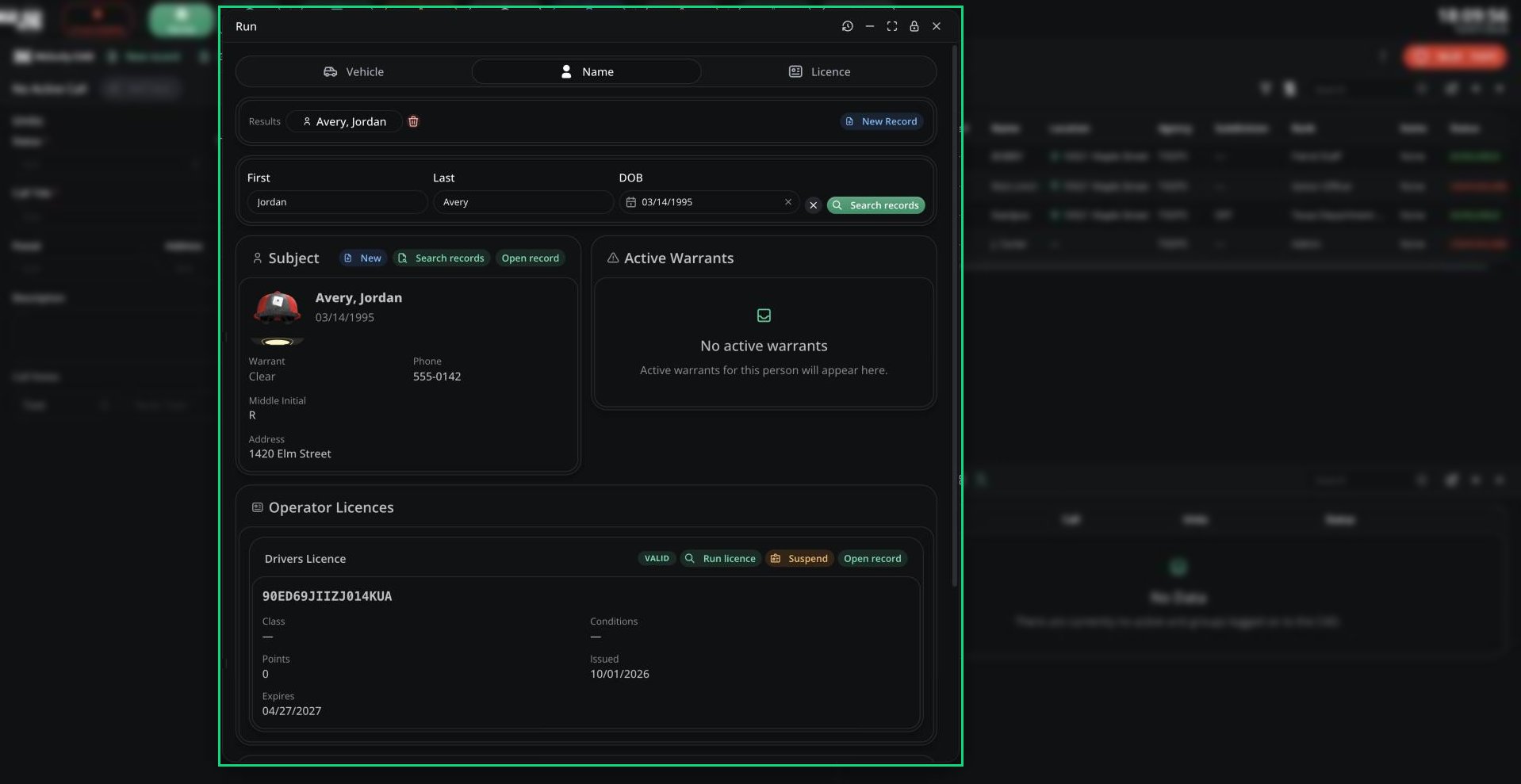
Click **Run Search** in the top bar, pick a tab and enter what you have. You can also open Run from:
* A Run page in a [custom layout](/CAD/Intro/layouts).
* A [quick traffic stop](/CAD/User/law-enforcement/traffic-stops), which runs the plate first.
* The [licence scanner](/CAD/User/law-enforcement#licence-scan) in the Melonly desktop app, which opens the scanned licence.
 | Tab | Enter |
| - | - |
| Vehicle | Plate (up to 10 characters) |
| Name | First, Last and DOB. DOB is only needed if your server turned off autocomplete. |
| Licence | Licence number |
| You run | You get |
| - | - |
| Vehicle | The vehicle, its registered owner (with warrant status) and the owner's licences |
| Name | The person, active warrants with charges, their licences and registered vehicles |
| Licence | The licence and holder, plus linked records for your panel |
Use **Run name**, **Run vehicle** or **Open record** on any card to dig deeper. Your last 25 runs are in the history icon.
### Licence results
Licence cards show a status (Valid, Expired, Suspended or Revoked), class, conditions, points and dates. Police units can click **Suspend**.
Licences restricted to other agencies don't appear.
### After a run
* **Add to call** links the results to your assigned call.
* **New Record** starts a record filled in from the results.
***
## Record Search
Open **Record Search** from the CAD menu, the Quick Lookup keybind, or the Search tab in Records Centre.
| Tab | Enter |
| - | - |
| Vehicle | Plate (up to 10 characters) |
| Name | First, Last and DOB. DOB is only needed if your server turned off autocomplete. |
| Licence | Licence number |
| You run | You get |
| - | - |
| Vehicle | The vehicle, its registered owner (with warrant status) and the owner's licences |
| Name | The person, active warrants with charges, their licences and registered vehicles |
| Licence | The licence and holder, plus linked records for your panel |
Use **Run name**, **Run vehicle** or **Open record** on any card to dig deeper. Your last 25 runs are in the history icon.
### Licence results
Licence cards show a status (Valid, Expired, Suspended or Revoked), class, conditions, points and dates. Police units can click **Suspend**.
Licences restricted to other agencies don't appear.
### After a run
* **Add to call** links the results to your assigned call.
* **New Record** starts a record filled in from the results.
***
## Record Search
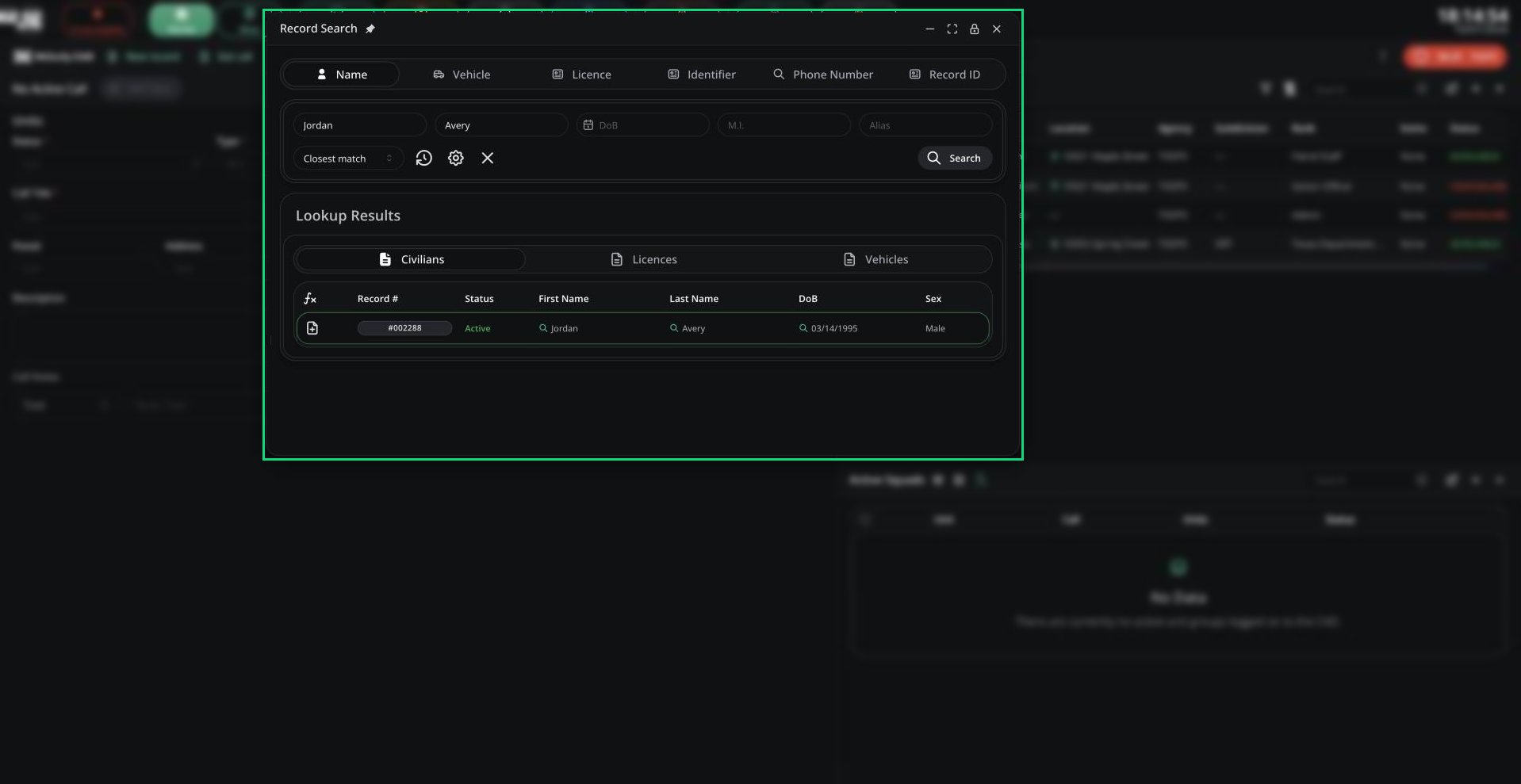
Open **Record Search** from the CAD menu, the Quick Lookup keybind, or the Search tab in Records Centre.
 | Tab | Search by |
| - | - |
| Name | First, Last, DoB, middle initial, alias |
| Vehicle | Plate |
| Licence | Licence number |
| ROBLOX | Roblox username (civilians only, if your server uses it) |
| Custom tabs | Your server's [search indices](/CAD/Admin/recordsreports/search-indices), such as phone number |
| Identifier | Unit number, agency, subdivision, badge number |
| Record ID | A record's number |
Switch tabs with Ctrl + 1, 2, 3 and so on.
| Option | What it does |
| - | - |
| Search mode | All fields (every field must match), Closest match (Name tab), or Any field |
| Advanced | Set each field to Exact, Partial or Starts with |
| Lookup History | Your searches from this session |
| Clear Search | Empties the fields |
Results are grouped by record type, up to 50 at a time. Exact name matches have a green outline. Use the create menu on a civilian, licence or vehicle row to start a record filled from it.
Agency-restricted records only show to units in that agency. On the DOT panel, Record Search only finds DOT records, so use Run to check people and vehicles.
***
## Alerts and Warnings
Runs and searches flag anything important. A tone plays and the CAD reads the flags aloud.
| Flag | Colour | Examples |
| - | - | - |
| Alerts | Red | Active warrant, or a template option your server marks as a flag |
| Warnings | Yellow | Licence expired, suspended or revoked; registration expired or cancelled |
On the Police panel, alerts are also sent to dispatchers. See [Flagged lookups](/CAD/User/law-enforcement#flagged-lookups).
***
## Licence Data
Click **View Licence Data** on a licence record to see its history.
| Tab | Shows |
| - | - |
| Demerit History | Each set of points, why, and when they drop off |
| Suspension History | Each suspension, its length, RP days left and the reason |
***
Still have questions? Join our Discord server for support from the Melonly Team.
This documentation is built and hosted on [Mintlify](https://mintlify.com), a developer documentation platform.
| Tab | Search by |
| - | - |
| Name | First, Last, DoB, middle initial, alias |
| Vehicle | Plate |
| Licence | Licence number |
| ROBLOX | Roblox username (civilians only, if your server uses it) |
| Custom tabs | Your server's [search indices](/CAD/Admin/recordsreports/search-indices), such as phone number |
| Identifier | Unit number, agency, subdivision, badge number |
| Record ID | A record's number |
Switch tabs with Ctrl + 1, 2, 3 and so on.
| Option | What it does |
| - | - |
| Search mode | All fields (every field must match), Closest match (Name tab), or Any field |
| Advanced | Set each field to Exact, Partial or Starts with |
| Lookup History | Your searches from this session |
| Clear Search | Empties the fields |
Results are grouped by record type, up to 50 at a time. Exact name matches have a green outline. Use the create menu on a civilian, licence or vehicle row to start a record filled from it.
Agency-restricted records only show to units in that agency. On the DOT panel, Record Search only finds DOT records, so use Run to check people and vehicles.
***
## Alerts and Warnings
Runs and searches flag anything important. A tone plays and the CAD reads the flags aloud.
| Flag | Colour | Examples |
| - | - | - |
| Alerts | Red | Active warrant, or a template option your server marks as a flag |
| Warnings | Yellow | Licence expired, suspended or revoked; registration expired or cancelled |
On the Police panel, alerts are also sent to dispatchers. See [Flagged lookups](/CAD/User/law-enforcement#flagged-lookups).
***
## Licence Data
Click **View Licence Data** on a licence record to see its history.
| Tab | Shows |
| - | - |
| Demerit History | Each set of points, why, and when they drop off |
| Suspension History | Each suspension, its length, RP days left and the reason |
***
Still have questions? Join our Discord server for support from the Melonly Team.
This documentation is built and hosted on [Mintlify](https://mintlify.com), a developer documentation platform.