> ## Documentation Index
> Fetch the complete documentation index at: https://docs.melonly.xyz/llms.txt
> Use this file to discover all available pages before exploring further.
# Preferences
> Change your CAD audio, radio and keybind settings, and learn what each notification sound means.
***
## Opening Preferences
Open the CAD menu and click **Preferences**. Changes apply straight away. Your preferences are saved on this device only.
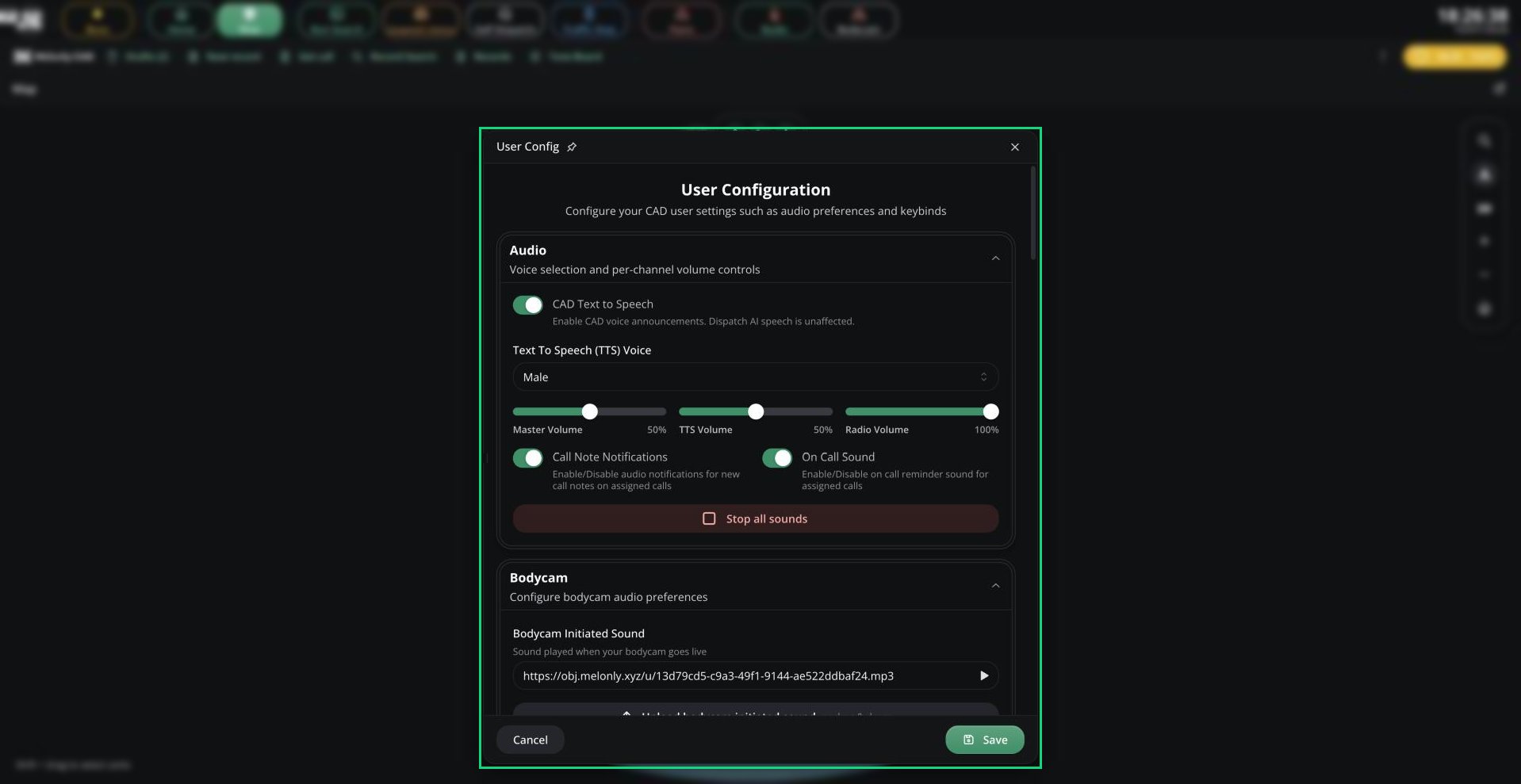 | Setting | Description |
| - | - |
| CAD Text to Speech | Read CAD events out loud. Doesn't affect Dispatch AI. On by default. |
| Text To Speech (TTS) Voice | Male or Female. |
| Master Volume | Overall CAD volume. |
| TTS Volume | Volume of voice announcements. |
| Radio Volume | Volume of radio audio. |
| Call Note Notifications | Play a sound when a note is added to your assigned call. |
| On Call Sound | Play a reminder sound while you're assigned to a call. |
| Bodycam Initiated Sound | The sound played when your bodycam goes live. |
| Setting | Description |
| - | - |
| Prioritize focused channel | Silence other channels while someone talks on your focused channel. |
| Legacy Radio FX | Use the older radio audio effects instead of the digital radio voice. |
| Radio FX strength | From a clean voice (0%) to a full radio effect (100%). |
| Input Device / Output Device | Your microphone and speakers. |
| Keybind Volume Change % | How much the volume keybinds change radio volume. |
| Remote PTT sound | Play a sound when someone else starts transmitting. Off by default. |
Opening Preferences from the Radio window shows only these settings.
Replace any radio sound with your own, or mute it: Key Down, Key Up, Talkover Blocked, Join, Listen-only join, Leave, Mute, Unmute, Volume Up, Volume Down and Volume Min / Max.
| Setting | Description |
| - | - |
| Disable native windows | Keep CAD windows inside the main app instead of popping them out. |
***
## Keybinds
Go to the Keybinds tab in Preferences, click a keybind, and press the keys or mouse button you want.
| Action | Default |
| - | - |
| Status: Available | `Ctrl` + `A` |
| Status: Unavailable | `Ctrl` + `U` |
| Status: Busy | `Ctrl` + `B` |
| Status: En-Route | `Ctrl` + `E` |
| Status: On-Scene | `Ctrl` + `O` |
| Custom statuses | Not bound |
| Panic | `Alt` + `P` |
| Quick Lookup | `Alt` + `L` |
| Toggle Recording (bodycam) | `Alt` + `R` |
| Radio push-to-talk | `Alt` + `T` |
| Radio Volume Up / Down | `Alt` + `+` / `Alt` + `-` |
| Cycle Joined Channels | `Alt` + `C` |
| Toggle Radio Mute | Not bound |
| Scan License (desktop app) | Not bound |
| Open the CAD (desktop app) | `Alt` + `X` |
* On Dispatch, status keybinds change the units you've selected. On other panels, they change your own unit.
* In the browser, keybinds don't work while you're typing in a text box.
* In the desktop app, keybinds work even when the CAD isn't focused. If some fail to register, check your system's input permissions for the app.
| Shortcut | Action |
| - | - |
| `Ctrl` + `Esc` (`⌘` + `Esc`) | Close the focused window |
| `Ctrl` + `Enter` (`⌘` + `Enter`) | Open your last server, from the server list |
| `Esc` | Clear a table's search box |
| `Shift` + click Radio | Open the full Radio window |
| `Shift` + click a channel | Join it without leaving your other channels |
| Right-click a channel | Open its settings |
| `Shift` + drag on the map | Select several units |
| Right-click the map | Show the closest units |
***
## Notification Sounds
These tones play for CAD events. Your server's admins can replace any of them. See [Custom Notification Tones](/CAD/Admin/customization/tones#custom-notification-tones).
| Tone | When it plays |
| - | - |
| Call Assigned | A call is assigned to you. |
| Call Unassigned | You're removed from a call. |
| On Call | Regularly while you're assigned to a call. |
| Call Note Added | A note is added to your assigned call. |
| Call Assigned Updated | Your assigned call's details change. |
| Unit Status Updated | A unit's status changes. |
| Panic | A unit triggers panic. |
| Timer | A timer ends. |
| Lookup Flags | A lookup returns warrants or alerts. |
| Signal Reminder | Repeats while a signal applies to you. |
| Group Assigned / Unassigned | You're added to or removed from a unit group. |
| Incoming Call | A new call matches your panel or dispatch filter. |
### Text-to-speech
With text-to-speech on, the CAD reads out assigned calls, new 911 calls, group changes, signals, panics, ankle monitor alerts and Falcon camera detections. 10-Codes are read as separate numbers, so 10-11 is read as "10 11".
### Pop-up alerts
You'll also see pop-ups when a dispatcher changes your status, another unit sends you a lookup, an ankle monitor triggers (Police and Dispatch), or a [Falcon camera](/CAD/Admin/config/falcon-cameras) detects something.
***
Still have questions? Join our Discord server for support from the Melonly Team.
This documentation is built and hosted on [Mintlify](https://mintlify.com), a developer documentation platform.
| Setting | Description |
| - | - |
| CAD Text to Speech | Read CAD events out loud. Doesn't affect Dispatch AI. On by default. |
| Text To Speech (TTS) Voice | Male or Female. |
| Master Volume | Overall CAD volume. |
| TTS Volume | Volume of voice announcements. |
| Radio Volume | Volume of radio audio. |
| Call Note Notifications | Play a sound when a note is added to your assigned call. |
| On Call Sound | Play a reminder sound while you're assigned to a call. |
| Bodycam Initiated Sound | The sound played when your bodycam goes live. |
| Setting | Description |
| - | - |
| Prioritize focused channel | Silence other channels while someone talks on your focused channel. |
| Legacy Radio FX | Use the older radio audio effects instead of the digital radio voice. |
| Radio FX strength | From a clean voice (0%) to a full radio effect (100%). |
| Input Device / Output Device | Your microphone and speakers. |
| Keybind Volume Change % | How much the volume keybinds change radio volume. |
| Remote PTT sound | Play a sound when someone else starts transmitting. Off by default. |
Opening Preferences from the Radio window shows only these settings.
Replace any radio sound with your own, or mute it: Key Down, Key Up, Talkover Blocked, Join, Listen-only join, Leave, Mute, Unmute, Volume Up, Volume Down and Volume Min / Max.
| Setting | Description |
| - | - |
| Disable native windows | Keep CAD windows inside the main app instead of popping them out. |
***
## Keybinds
Go to the Keybinds tab in Preferences, click a keybind, and press the keys or mouse button you want.
| Action | Default |
| - | - |
| Status: Available | `Ctrl` + `A` |
| Status: Unavailable | `Ctrl` + `U` |
| Status: Busy | `Ctrl` + `B` |
| Status: En-Route | `Ctrl` + `E` |
| Status: On-Scene | `Ctrl` + `O` |
| Custom statuses | Not bound |
| Panic | `Alt` + `P` |
| Quick Lookup | `Alt` + `L` |
| Toggle Recording (bodycam) | `Alt` + `R` |
| Radio push-to-talk | `Alt` + `T` |
| Radio Volume Up / Down | `Alt` + `+` / `Alt` + `-` |
| Cycle Joined Channels | `Alt` + `C` |
| Toggle Radio Mute | Not bound |
| Scan License (desktop app) | Not bound |
| Open the CAD (desktop app) | `Alt` + `X` |
* On Dispatch, status keybinds change the units you've selected. On other panels, they change your own unit.
* In the browser, keybinds don't work while you're typing in a text box.
* In the desktop app, keybinds work even when the CAD isn't focused. If some fail to register, check your system's input permissions for the app.
| Shortcut | Action |
| - | - |
| `Ctrl` + `Esc` (`⌘` + `Esc`) | Close the focused window |
| `Ctrl` + `Enter` (`⌘` + `Enter`) | Open your last server, from the server list |
| `Esc` | Clear a table's search box |
| `Shift` + click Radio | Open the full Radio window |
| `Shift` + click a channel | Join it without leaving your other channels |
| Right-click a channel | Open its settings |
| `Shift` + drag on the map | Select several units |
| Right-click the map | Show the closest units |
***
## Notification Sounds
These tones play for CAD events. Your server's admins can replace any of them. See [Custom Notification Tones](/CAD/Admin/customization/tones#custom-notification-tones).
| Tone | When it plays |
| - | - |
| Call Assigned | A call is assigned to you. |
| Call Unassigned | You're removed from a call. |
| On Call | Regularly while you're assigned to a call. |
| Call Note Added | A note is added to your assigned call. |
| Call Assigned Updated | Your assigned call's details change. |
| Unit Status Updated | A unit's status changes. |
| Panic | A unit triggers panic. |
| Timer | A timer ends. |
| Lookup Flags | A lookup returns warrants or alerts. |
| Signal Reminder | Repeats while a signal applies to you. |
| Group Assigned / Unassigned | You're added to or removed from a unit group. |
| Incoming Call | A new call matches your panel or dispatch filter. |
### Text-to-speech
With text-to-speech on, the CAD reads out assigned calls, new 911 calls, group changes, signals, panics, ankle monitor alerts and Falcon camera detections. 10-Codes are read as separate numbers, so 10-11 is read as "10 11".
### Pop-up alerts
You'll also see pop-ups when a dispatcher changes your status, another unit sends you a lookup, an ankle monitor triggers (Police and Dispatch), or a [Falcon camera](/CAD/Admin/config/falcon-cameras) detects something.
***
Still have questions? Join our Discord server for support from the Melonly Team.
This documentation is built and hosted on [Mintlify](https://mintlify.com), a developer documentation platform.