> ## Documentation Index
> Fetch the complete documentation index at: https://docs.melonly.xyz/llms.txt
> Use this file to discover all available pages before exploring further.
# Top Bar & CAD Menu
> Every button on the CAD top bar and in the CAD menu, and which panels have them.
***
## Top Bar
On Police, Fire, EMS, DOT and Dispatch, the top bar has two rows. The top row holds your main actions, and the second row holds drafts, new records, your favourite windows and your unit.
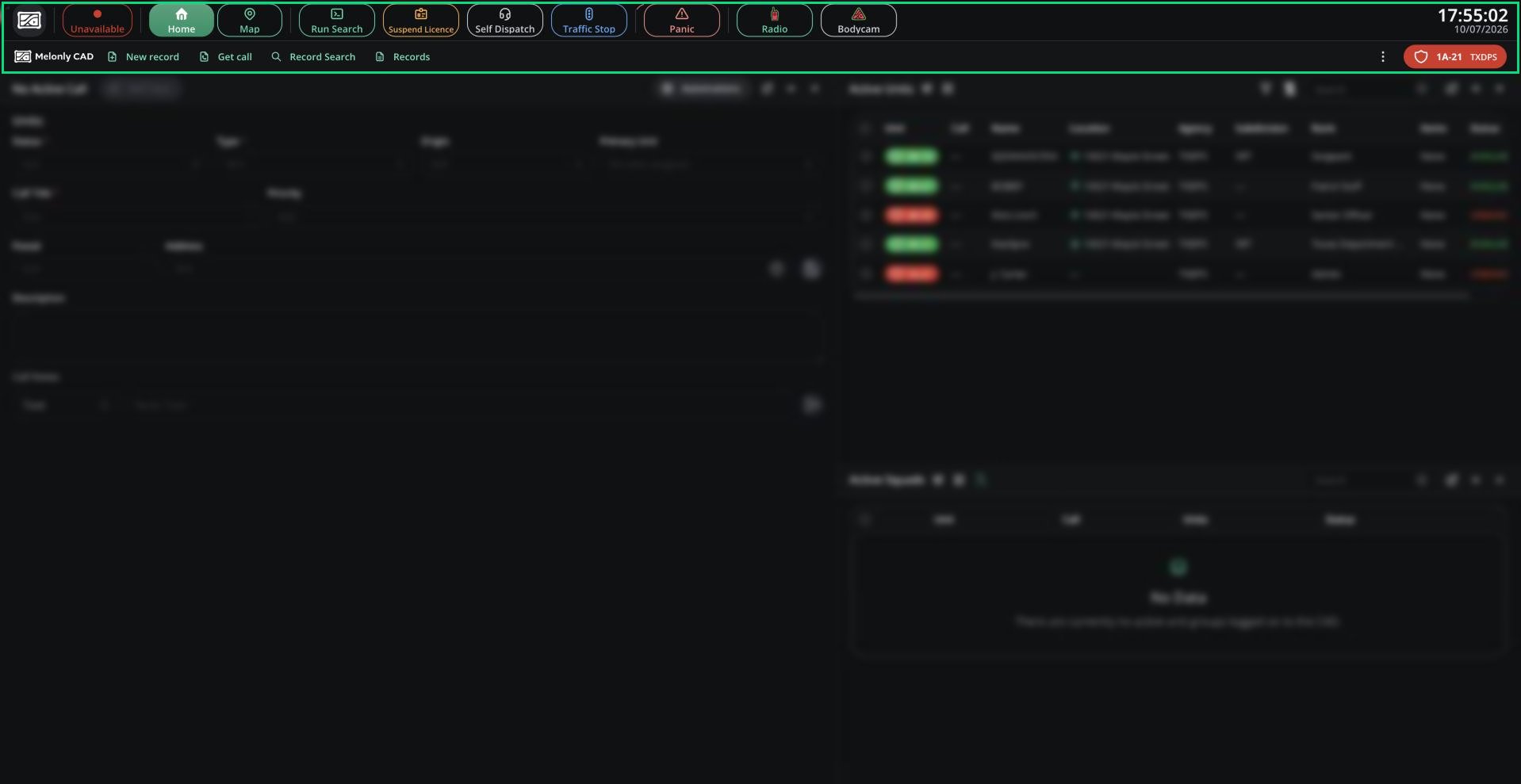 | Control | What it does | Panels |
| - | - | - |
| Status | Change your status. See [Units](/CAD/User/units). | All |
| Home / Map | Switch between your workspace, the live map, and your custom views. | Service panels |
| New Call, Live Map, New Record, Get Call, Assign Units | Dispatch console actions. See [Dispatch](/CAD/User/dispatch). | Dispatch |
| Run Search | Run a name, plate or licence. See [Run Search](/CAD/Intro/interface#run-search). | All |
| Suspend Licence | Suspend a licence. See [Suspending a Licence](/CAD/User/law-enforcement/suspending-licences). | Police |
| Self Dispatch | Pick up calls yourself, if your server allows it or you're a supervisor. | Service panels |
| Traffic Stop | Start a traffic stop. See [Traffic Stops](/CAD/User/law-enforcement/traffic-stops). | Police |
| Panic | Trigger or cancel panic. The top bar pulses red while it's active. | Service panels |
| Radio | Quick radio menu. `Shift` + click opens the full Radio window. See [Radio](/CAD/User/radio). | Service panels, Dispatch |
| Bodycam | Stream and record your bodycam. See [Bodycam](/CAD/Intro/interface#bodycam). | Service panels |
| Clock | Server time. Click for a large clock. | All |
| Control | What it does | Panels |
| - | - | - |
| Drafts | Records you started but didn't file. | All |
| New record | Create a record or report. | Service panels |
| Get call | Look up a call by its incident number. | Service panels |
| Favourites | Your pinned windows. See [Favourites](/CAD/Intro/layouts#quick-bar-favourites). | All |
| ⋮ | Every window you can open. | All |
| Selective Dispatching | Limit what you see to certain panels or agencies. | Dispatch |
| Unit chip | Your callsign and agency. Click to open the Unit Manager. | All |
When a signal applies to your panel, a red banner appears under the top bar and a reminder tone plays until it ends.
Civilian, Law and DMV use a simpler bar with the CAD menu in the centre. See [Civilian](/CAD/User/civilian), [Law](/CAD/User/law) and [DMV](/CAD/User/dmv) for their buttons.
***
## CAD Menu
Click the logo at the top-left (or the panel name, on Civilian, Law and DMV) to open the CAD menu.
| Control | What it does | Panels |
| - | - | - |
| Status | Change your status. See [Units](/CAD/User/units). | All |
| Home / Map | Switch between your workspace, the live map, and your custom views. | Service panels |
| New Call, Live Map, New Record, Get Call, Assign Units | Dispatch console actions. See [Dispatch](/CAD/User/dispatch). | Dispatch |
| Run Search | Run a name, plate or licence. See [Run Search](/CAD/Intro/interface#run-search). | All |
| Suspend Licence | Suspend a licence. See [Suspending a Licence](/CAD/User/law-enforcement/suspending-licences). | Police |
| Self Dispatch | Pick up calls yourself, if your server allows it or you're a supervisor. | Service panels |
| Traffic Stop | Start a traffic stop. See [Traffic Stops](/CAD/User/law-enforcement/traffic-stops). | Police |
| Panic | Trigger or cancel panic. The top bar pulses red while it's active. | Service panels |
| Radio | Quick radio menu. `Shift` + click opens the full Radio window. See [Radio](/CAD/User/radio). | Service panels, Dispatch |
| Bodycam | Stream and record your bodycam. See [Bodycam](/CAD/Intro/interface#bodycam). | Service panels |
| Clock | Server time. Click for a large clock. | All |
| Control | What it does | Panels |
| - | - | - |
| Drafts | Records you started but didn't file. | All |
| New record | Create a record or report. | Service panels |
| Get call | Look up a call by its incident number. | Service panels |
| Favourites | Your pinned windows. See [Favourites](/CAD/Intro/layouts#quick-bar-favourites). | All |
| ⋮ | Every window you can open. | All |
| Selective Dispatching | Limit what you see to certain panels or agencies. | Dispatch |
| Unit chip | Your callsign and agency. Click to open the Unit Manager. | All |
When a signal applies to your panel, a red banner appears under the top bar and a reminder tone plays until it ends.
Civilian, Law and DMV use a simpler bar with the CAD menu in the centre. See [Civilian](/CAD/User/civilian), [Law](/CAD/User/law) and [DMV](/CAD/User/dmv) for their buttons.
***
## CAD Menu
Click the logo at the top-left (or the panel name, on Civilian, Law and DMV) to open the CAD menu.
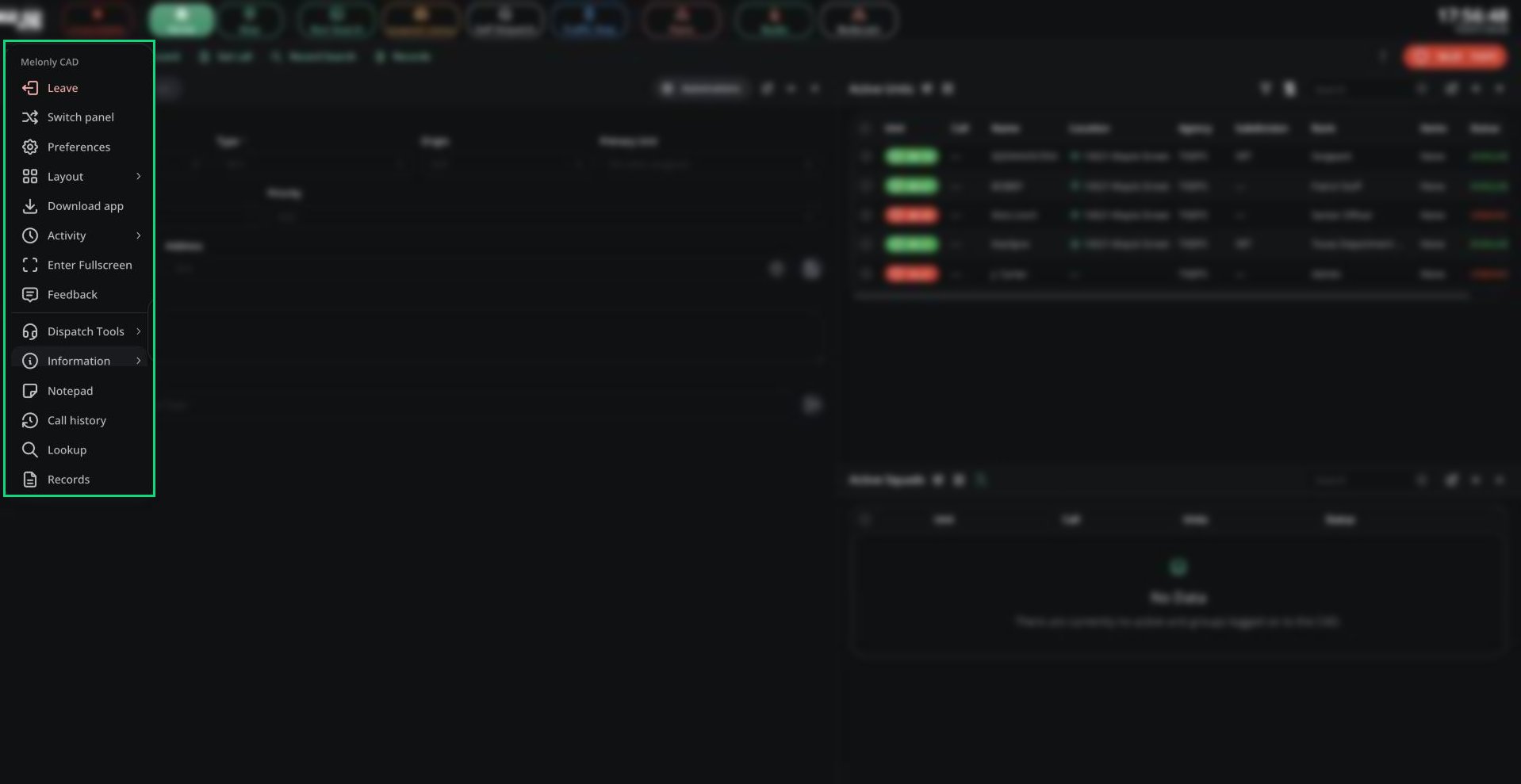 | Item | What it does |
| - | - |
| Leave | Go back to the server list. |
| Switch panel | Go back to this server's panel picker. |
| Preferences | Your personal settings. See [Preferences](/CAD/Intro/preferences). |
| Layout | Save, load and share layouts. See [Layouts](/CAD/Intro/layouts). |
| Download app | Get the [desktop app](/CAD/Intro/interface#desktop-app). |
| Activity | Start and end shifts. See [Clocking In](/CAD/Intro/joining#clocking-in). |
| Fullscreen, Feedback | Toggle fullscreen, or send feedback to Melonly. |
| Dispatch Tools | Tone board, signal manager, timers and live map. On Dispatch, and on service panels for supervisors or when self-dispatch is allowed. |
| Information | Your server's Penal Code and 10-Codes. |
| Notepad | Your notes. Drag records onto a note to attach them. |
| Call history | Browse past calls. |
| Lookup, Records | Search records and open the Records Centre. See [Records](/CAD/User/records). |
***
Still have questions? Join our Discord server for support from the Melonly Team.
This documentation is built and hosted on [Mintlify](https://mintlify.com), a developer documentation platform.
| Item | What it does |
| - | - |
| Leave | Go back to the server list. |
| Switch panel | Go back to this server's panel picker. |
| Preferences | Your personal settings. See [Preferences](/CAD/Intro/preferences). |
| Layout | Save, load and share layouts. See [Layouts](/CAD/Intro/layouts). |
| Download app | Get the [desktop app](/CAD/Intro/interface#desktop-app). |
| Activity | Start and end shifts. See [Clocking In](/CAD/Intro/joining#clocking-in). |
| Fullscreen, Feedback | Toggle fullscreen, or send feedback to Melonly. |
| Dispatch Tools | Tone board, signal manager, timers and live map. On Dispatch, and on service panels for supervisors or when self-dispatch is allowed. |
| Information | Your server's Penal Code and 10-Codes. |
| Notepad | Your notes. Drag records onto a note to attach them. |
| Call history | Browse past calls. |
| Lookup, Records | Search records and open the Records Centre. See [Records](/CAD/User/records). |
***
Still have questions? Join our Discord server for support from the Melonly Team.
This documentation is built and hosted on [Mintlify](https://mintlify.com), a developer documentation platform.