> ## Documentation Index
> Fetch the complete documentation index at: https://docs.melonly.xyz/llms.txt
> Use this file to discover all available pages before exploring further.
# Radio FX
> Make voices on a radio channel sound like a real radio, and fine-tune the effect with advanced settings.
***
## What is Radio FX?
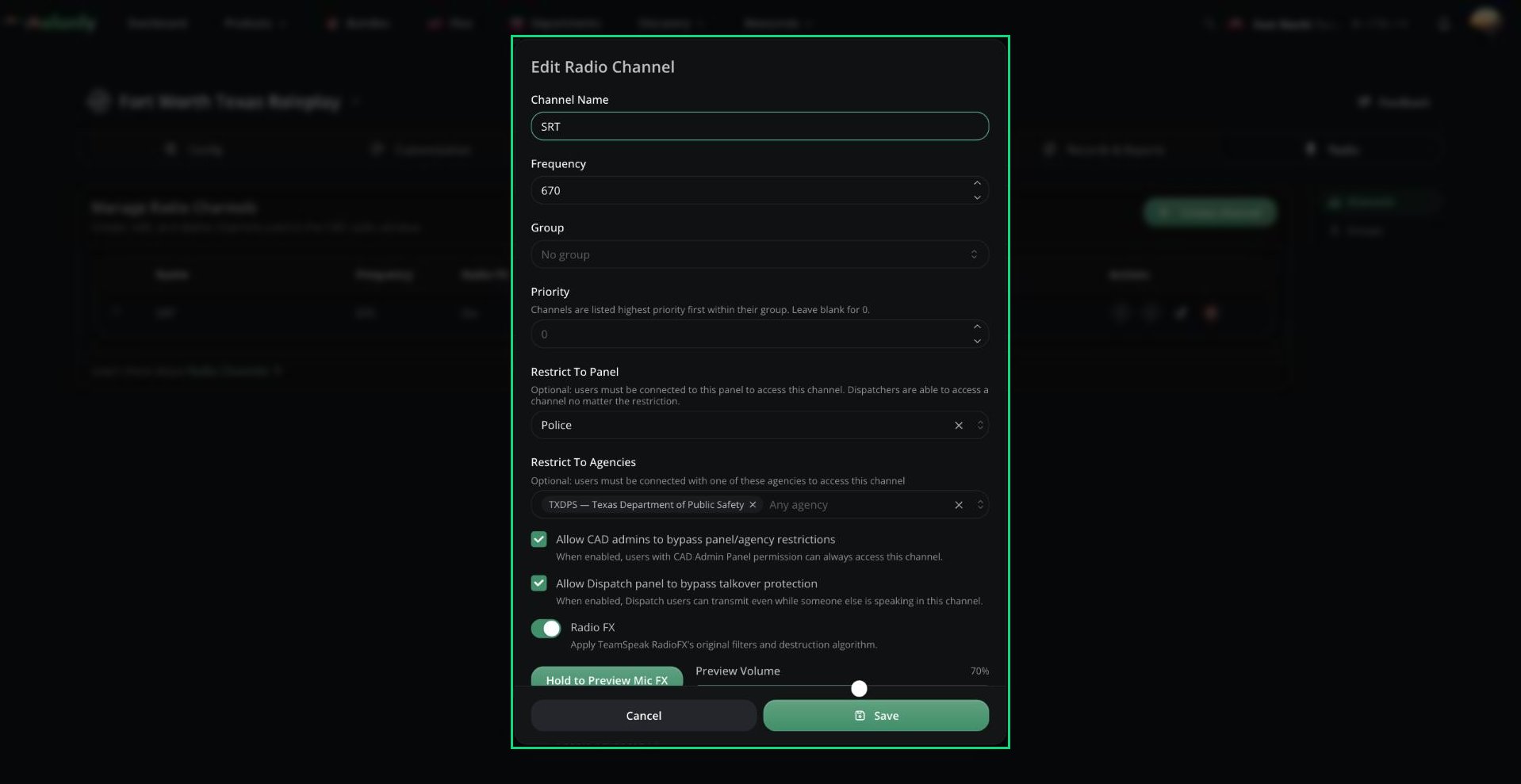
Radio FX makes voices on a channel sound like a real radio. Turn it on with the **Radio FX** option when you create or edit a [channel](/CAD/Admin/radio#channels).
***
## Previewing the Sound
In the channel editor, hold **Hold to Preview Mic FX** (or `Space`) and talk to hear it on your own voice. Use headphones to avoid feedback.
 ***
## Advanced FX
Tick **Enable Advanced FX** to fine-tune the sound. Advanced settings are only saved while it's ticked, and **Reset advanced FX** puts everything back to default.
| Setting | Description |
| - | - |
| Input Gain (dB) | Boost or cut your voice before any effects, from -24 to 24. |
| Output Gain (dB) | Final volume after the effects, from -24 to 24. Use it to match other channels. |
| Dry/Wet Mix | How much of the effect you hear. 100% is the full radio sound. Lower values mix in your normal voice. |
Radio FX limits speech to 300 to 3000 Hz before and after adding radio texture. Change these to adjust the tone.
| Setting | Default |
| - | - |
| Input Highpass (Hz) | 300 |
| Input Lowpass (Hz) | 3000 |
| Output Highpass (Hz) | 300 |
| Output Lowpass (Hz) | 3000 |
Each can be set from 0 to 20000.
Tick **Enable Equalizer** to add up to 16 bands after the base effect. Click **Add band** to add one.
| Setting | Description |
| - | - |
| Type | Peaking, Low Shelf, or High Shelf. |
| Freq (Hz) | 10 to 20000. |
| Gain (dB) | -24 to 24. |
| Q | Width of the band, 0.1 to 30. |
The default bands are a low shelf at 250 Hz (-3 dB), a peak at 1200 Hz (+2 dB), and a high shelf at 4500 Hz (-2 dB).
| Setting | Description |
| - | - |
| Enable Expander | Reduces background noise between words. |
| Expander Threshold | Sound below this level is pushed down. 0 to 1, default 0.04. |
| Expander Ratio | Higher means stronger noise reduction. 1 to 20, default 4. |
| Expander Mix | Default 85%. |
| Enable Limiter | Stops sudden loud spikes. |
| Limiter Threshold (dB) | -60 to 0, default -6. |
| Limiter Release (ms) | 0 to 2000, default 120. |
| Setting | Description |
| - | - |
| Enable Distortion | Adds saturation for a grittier sound. |
| Drive | Higher means more saturation. 0 to 20, default 2. |
| Curve | Soft (tanh), Hard Clip, Foldback, or Staircase. |
| Staircase Steps | Only for the Staircase curve. Lower means more crunch. 2 to 512. |
| Oversample | None, 2x, or 4x. |
| Distortion Mix | How much distortion to blend in. |
| Enable Bitcrush | Extra digital crunch. |
| Bitcrush Steps | 2 to 512. |
| Bitcrush Mix | How much bitcrush to blend in. |
| Setting | Description |
| - | - |
| Enable Delay | A short echo. Use lightly for an old-radio feel. |
| Delay Time (ms) | 0 to 2000, default 90. |
| Delay Feedback | 0 is a single echo, and higher values repeat. 0 to 0.98. |
| Delay Lowpass (Hz) | Makes echoes darker. 10 to 20000. |
| Enable Reverb | Adds a small room sound. |
| Pre-delay (ms), Decay (s), Dampening (Hz) | Shape the reverb. Lower dampening gives a darker tail. |
| Enable Wow/Flutter | Subtle wobble, like unstable old hardware. Set Rate (Hz) and Depth (ms). |
| Enable Stereo Panning | Moves the voice left (-1) or right (+1). Mostly for special effects. |
Each effect has its own Mix setting.
***
Still have questions? Join our Discord server for support from the Melonly Team.
This documentation is built and hosted on [Mintlify](https://mintlify.com), a developer documentation platform.
***
## Advanced FX
Tick **Enable Advanced FX** to fine-tune the sound. Advanced settings are only saved while it's ticked, and **Reset advanced FX** puts everything back to default.
| Setting | Description |
| - | - |
| Input Gain (dB) | Boost or cut your voice before any effects, from -24 to 24. |
| Output Gain (dB) | Final volume after the effects, from -24 to 24. Use it to match other channels. |
| Dry/Wet Mix | How much of the effect you hear. 100% is the full radio sound. Lower values mix in your normal voice. |
Radio FX limits speech to 300 to 3000 Hz before and after adding radio texture. Change these to adjust the tone.
| Setting | Default |
| - | - |
| Input Highpass (Hz) | 300 |
| Input Lowpass (Hz) | 3000 |
| Output Highpass (Hz) | 300 |
| Output Lowpass (Hz) | 3000 |
Each can be set from 0 to 20000.
Tick **Enable Equalizer** to add up to 16 bands after the base effect. Click **Add band** to add one.
| Setting | Description |
| - | - |
| Type | Peaking, Low Shelf, or High Shelf. |
| Freq (Hz) | 10 to 20000. |
| Gain (dB) | -24 to 24. |
| Q | Width of the band, 0.1 to 30. |
The default bands are a low shelf at 250 Hz (-3 dB), a peak at 1200 Hz (+2 dB), and a high shelf at 4500 Hz (-2 dB).
| Setting | Description |
| - | - |
| Enable Expander | Reduces background noise between words. |
| Expander Threshold | Sound below this level is pushed down. 0 to 1, default 0.04. |
| Expander Ratio | Higher means stronger noise reduction. 1 to 20, default 4. |
| Expander Mix | Default 85%. |
| Enable Limiter | Stops sudden loud spikes. |
| Limiter Threshold (dB) | -60 to 0, default -6. |
| Limiter Release (ms) | 0 to 2000, default 120. |
| Setting | Description |
| - | - |
| Enable Distortion | Adds saturation for a grittier sound. |
| Drive | Higher means more saturation. 0 to 20, default 2. |
| Curve | Soft (tanh), Hard Clip, Foldback, or Staircase. |
| Staircase Steps | Only for the Staircase curve. Lower means more crunch. 2 to 512. |
| Oversample | None, 2x, or 4x. |
| Distortion Mix | How much distortion to blend in. |
| Enable Bitcrush | Extra digital crunch. |
| Bitcrush Steps | 2 to 512. |
| Bitcrush Mix | How much bitcrush to blend in. |
| Setting | Description |
| - | - |
| Enable Delay | A short echo. Use lightly for an old-radio feel. |
| Delay Time (ms) | 0 to 2000, default 90. |
| Delay Feedback | 0 is a single echo, and higher values repeat. 0 to 0.98. |
| Delay Lowpass (Hz) | Makes echoes darker. 10 to 20000. |
| Enable Reverb | Adds a small room sound. |
| Pre-delay (ms), Decay (s), Dampening (Hz) | Shape the reverb. Lower dampening gives a darker tail. |
| Enable Wow/Flutter | Subtle wobble, like unstable old hardware. Set Rate (Hz) and Depth (ms). |
| Enable Stereo Panning | Moves the voice left (-1) or right (+1). Mostly for special effects. |
Each effect has its own Mix setting.
***
Still have questions? Join our Discord server for support from the Melonly Team.
This documentation is built and hosted on [Mintlify](https://mintlify.com), a developer documentation platform.